TL;DR:
→ Your workflow instructions are probably too vague or too long (300-line mega-prompts don’t work)
→ Claude Skills package your expertise into reusable how-to manuals that activate automatically
→ The process: Map workflow → Break down steps → Build skills → Test and reuse
→ Live demo: Building a meeting notes organizer skill in real-time
→ One simple prompt can trigger multiple skills that execute complex workflows flawlessly
I just wrapped my Lightning Lesson on “Design Your First Skill-Powered Workflow” and wanted to share the recording with you.
Most people get workflow instructions wrong in one of two ways:
Too high-level: “Research our competitor and write a brief.” Claude guesses. You get mediocre results.
Too detailed: A 300-line mega-prompt that hits context limits and still doesn’t perform.
The real issue? Tasks that require precise procedural control—the kind you execute manually with rigor—need a different approach.
That’s where Claude Skills come in.
What You’ll Learn in This Session
The mental model: Think of Skills as instruction manuals. When you ask Claude to “organize meeting notes,” it automatically reads the how-to manual you’ve created, complete with edge cases, examples, and resources.
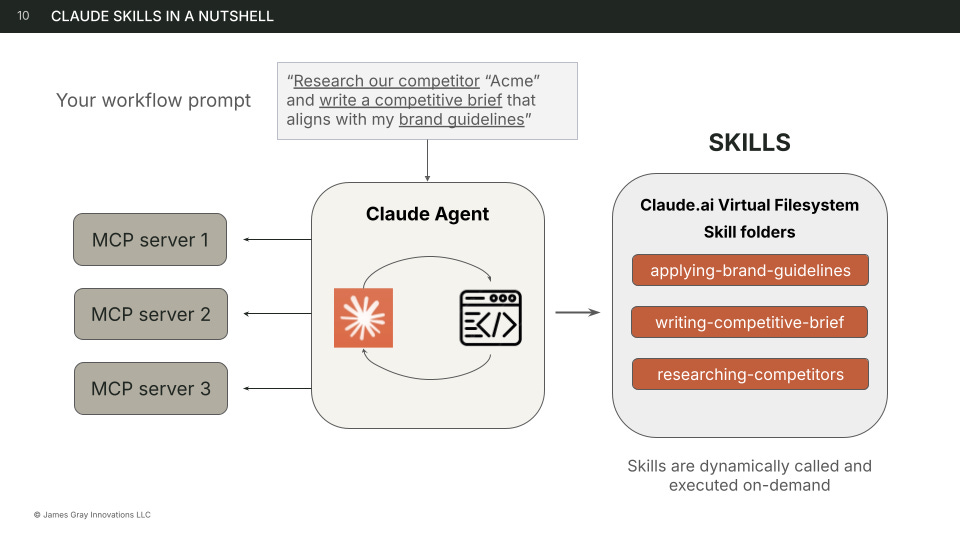
The activation pattern: Claude reads all your skill metadata when you boot up. When keywords in your prompt match a skill, it pulls the full instructions and executes. No more explaining the same process 50 times.
The build process:
Map your workflow (business process → workflows → steps)
Identify skill-worthy tasks (repeatable + need rigor)
Collaborate with Claude to build the skill
Test it and add to your toolbox
Live demonstration: I built a meeting notes organizer skill from scratch in the session—you’ll see the exact questions Claude asks, how to answer them, and what the final skill looks like.
Real workflow example: I showed my Lightning Lesson creation workflow that went from this 300-line manual process to a single prompt:
“Create a new Lightning Lesson on [topic]”
→ Claude designs the lesson, creates a Word doc, and saves it to the Notion database. Three skills activated automatically.
Why This Changes Everything
Here’s what clicked for attendees:
Skills aren’t just about saving keystrokes. They’re about packaging your domain expertise so Claude doesn’t have to read your mind.
When you build a skill, you’re creating IP. Reusable assets you own. A war chest of procedures that compound over time.
I’ve built 50+ skills for my one-person business. Each one unlocks work I used to find too cumbersome to do consistently.
Watch the Full Session
The recording walks through:
The decomposition framework (Process → Workflow → Skill)
Live skill creation with real-time Q&A
How skills activate based on keywords
My actual Notion database showing skill-powered workflows
Common mistakes and how to avoid them
Go Deeper: Claude for Builders Course
If you want to get hands-on and go deeper with Claude, Claude Code, and Cowork, join me for a cohort adventure to learn with other builders who want to operationalize high-value use cases.
In 5 weeks, you’ll build:
✅ Foundation: Configure your builder stack and design systematic workflows
✅ Reusable Assets: Build Claude Skills that execute your expertise on demand
✅ Collaborative AI: Deploy workflows where Claude works WITH you
✅ Autonomous Workflows: Build multi-agent systems and browser automations that run independently
✅ Applications: Ship web app prototypes using agentic coding—no engineering required
You get intimate cohorts, 1:1 coaching, and lifetime access.
We build together—not lectures.
First cohort launches Jan 26 — limited to 20 builders.
Use promo code FOUNDER to save 25%, shape the course, and attend again free in 2026.
Your Turn
Drop a comment and tell me: What’s the first workflow you’re going to supercharge with Claude skills?
I read and respond to every comment—and the best ideas might become future Lightning Lessons.
Stay curious,
James
P.S. Two more Lightning Lessons coming up if you want to keep building:
→ Deconstruct Your Workflows for Agentic AI — Friday, Jan 24 (sign up for free ) - Learn a framework to break workflows into AI-executable steps
→ Build Your Agentic Workflow Registry — Friday, Jan 31 (sign up for free)
Map all your processes, workflows, and AI assets in a registry