


TL;DR:
Most people skip from “I want AI to do X” straight to the tool — and wonder why the results are mediocre.
The missing step is decomposition: breaking your workflow into discrete steps before you build anything.
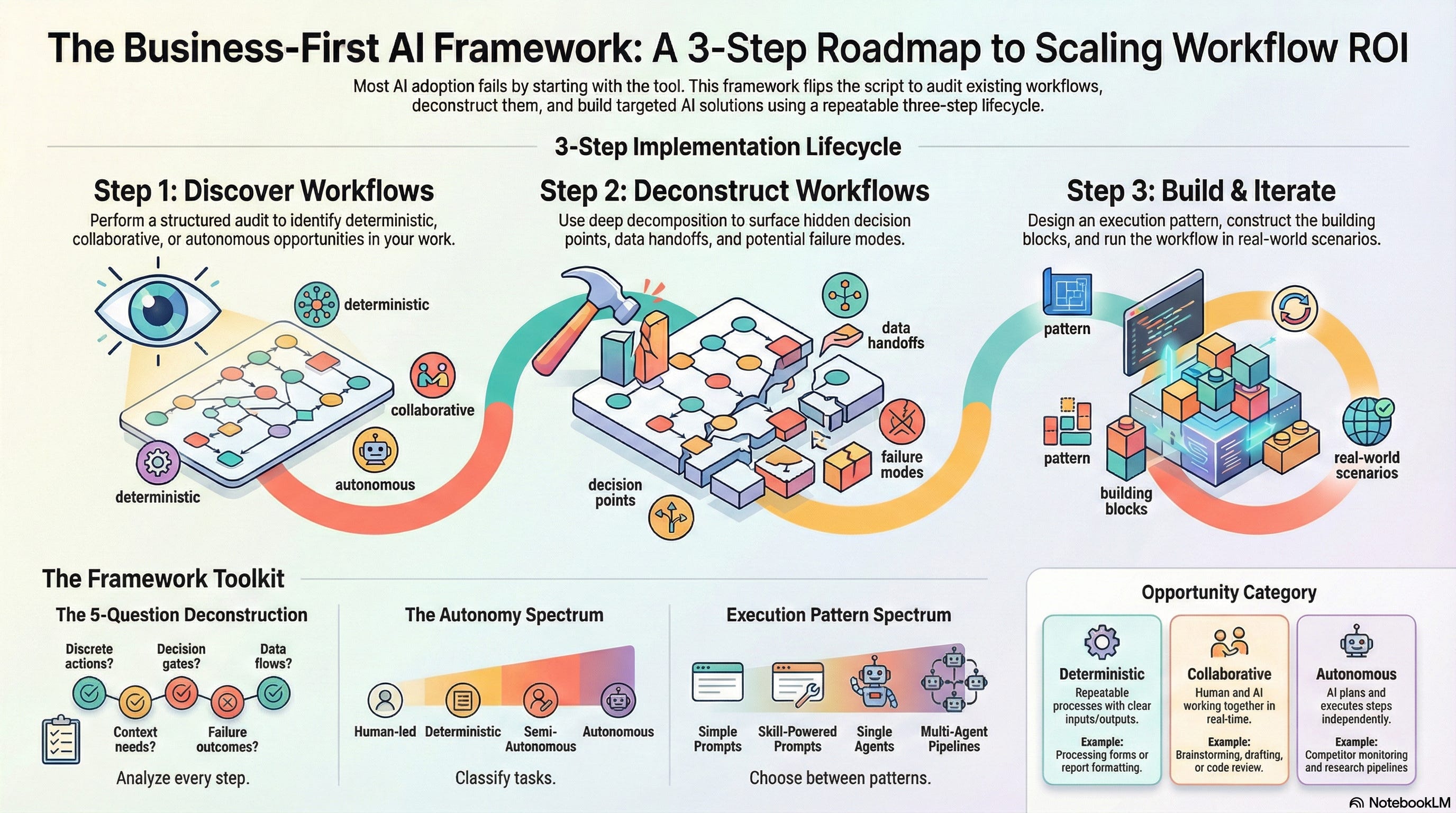
The Business-First AI Framework (Discover → Deconstruct → Build) is a three-step process that closes this gap.
Deconstruct is the step everyone skips — and it’s the most important one.
Everything is open source. Try it right now — links to get started below.
I watched a student spend two hours building something impressive, only for it to completely break.
She’d taken about ten Google Slides — detailed internal procedures her team uses for pipeline analysis — and packed them into a Google Gem. The setup was sophisticated. She’d included scoring rubrics, qualification criteria, and stage-by-stage review processes. Everything her team’s top performers actually do when they evaluate a deal.
The Gem couldn’t deliver.
Not because the AI wasn’t capable. Not because Google Gems are limited. The instructions she’d written described what the pipeline review should accomplish — but not how her team actually does it at the step-by-step level. The scoring rubrics were there, but the decision logic connecting them wasn’t. The criteria were listed, but the sequence for evaluating them — which signals what to check first, when to escalate, and what constitutes a red flag versus a yellow flag — lived in her head, not in the instructions.
When she realized this, you could see the shift. “The AI can’t read my mind,” she said. “I need to describe this the way I’d train a new analyst — not the way I’d summarize it for my boss.”
That’s the aha moment. And I see some version of it every single cohort.
The pattern is always the same. Someone has a clear idea of what they want AI to do. They go straight to the tool. They spend an hour — sometimes several — iterating on prompts, rearranging context, trying different approaches. The output is decent but never quite right. Eventually, they either settle for “good enough” or give up.
The problem isn’t the tool. It’s the step they skipped.
The Idea-to-Implementation Chasm
Most AI education teaches you tools. How to write better prompts. Which model to use for which task? How to set up a GPT, a Gem, or a Project.
Almost nobody teaches the bridge: how to go from “I want AI to do X” to a working, repeatable workflow that actually performs.
This matters because people are trying to reach three very different outcomes with AI — and they often don’t realize which one they need:
Collaborative AI — You drive the process, AI contributes. Co-writing a document, brainstorming a strategy, and reviewing code together. The AI is a capable partner, but you’re steering.
Deterministic Automation — A repeatable process that AI executes reliably with minimal supervision. Formatting reports, processing forms, and generating standardized communications. You define the rules once; AI follows them every time.
Autonomous Agents — AI plans and executes multi-step work independently. Research pipelines, monitoring systems, and multi-stage content production. You set the goal; AI figures out the steps.
Without a structured approach to get there, most people default to option 1 — chatting back and forth — even when what they actually need is option 2 or 3. They’re using AI as a conversation partner when they should be using it as an engine.
The Business-First AI Framework
I built this framework because I kept watching the same failure mode play out.
People would come to my cohorts with real workflows they wanted to automate. Good ideas, real pain points. But they had no standardized way to articulate what the workflow does and why each step matters — at the level of detail AI needs to execute it. There was no business methodology for translating “here’s what my team does” into a specification that an AI could work from.
So they’d skip straight to the how. Open ChatGPT, start writing prompts, iterate for hours. The problem isn’t that they lacked technical skill. The problem is they were trying to build before they’d defined what they were building. It’s like writing code before you’ve written requirements — you’ll produce something, but it won’t be what you actually need.
The Business-First AI Framework puts the what and the why first. Three steps, and the order matters.
Step 1 — Discover.
Audit your workflows and identify which ones are candidates for AI.
Before you can apply AI to anything, you need to know where it fits. Step 1 is a structured audit that scans your role, responsibilities, recurring tasks, pain points, and multi-step processes — then produces a prioritized list of opportunities categorized as Collaborative AI, Deterministic Automation, or Autonomous Agent.
The key insight: don’t start with the technology and ask “where should we use it?” Start with your workflows and ask, “Which of these would benefit most from AI?”
Most people discover 5-15 opportunities they’d never considered. The audit surfaces patterns you miss in the daily grind.
Step 2 — Deconstruct.
Break the chosen workflow into atomic steps.
This is the step everyone skips. And it’s the most important one.
You describe your workflow — rough and incomplete is fine — and then systematically decompose each step using five questions:
Discrete steps — Is this actually one step, or multiple steps bundled together?
Decision points — Are there if/then branches, quality gates, or judgment calls?
Data flows — What goes in? What comes out? Where from and where to?
Context needs — What documents, files, or reference materials does this step require?
Failure modes — What happens when this step fails?
A workflow that starts as 5-8 rough steps typically expands to 12-20 refined steps after this process. That expansion is the point — it surfaces every hidden sub-step, every implicit decision, every assumption you’d internalized so deeply you forgot it was there.
Remember the Google Gem student? Had she run her pipeline review process through these five questions first, she would have seen immediately that her instructions lacked decision logic. The scoring rubrics were there, but the workflow connecting them — the sequence, the branching, the escalation criteria — wasn’t described at the level of detail the AI needed to execute it.
The deliverable from Step 2 is a Workflow Definition—a structured Markdown file that captures every step in detail. It’s platform-agnostic. It works whether you’re building for ChatGPT, Claude, Gemini, or anything else.
Step 3 — Build.
Design the AI implementation, then construct it.
Step 3 takes your Workflow Definition and turns it into a working AI workflow through three parts:
Design — Choose your execution pattern. A simple prompt? A skill-powered prompt with reusable routines? A single autonomous agent? A multi-agent pipeline? The right choice depends on what your workflow actually needs — not on what sounds most impressive.
Construct — Build only what your pattern requires. Map each step to the right AI building block: prompts, context documents, skills, agents, or tool connections. The Building Block Spec from Design tells you exactly what to create and in what order.
Run — Execute the workflow on a real scenario. Evaluate. Iterate. Most workflows require 2-4 rounds of refinement before producing reliably good output.
The output is a Baseline Workflow Prompt you can paste into any AI tool and run immediately. For more complex workflows, you get agent configurations and skill definitions that you can deploy to Claude or adapt for other platforms.
Why Deconstruct Changes Everything
Two patterns I see repeatedly:
The “I described the what, not the how” pattern. Like the Google Gem student. People describe the outcome they want — “review my pipeline deals and score them” — without describing the process at the level of detail AI needs to actually do it. Deconstruction forces you to articulate every step, which reveals what was implicit.
The “skip to the tool” pattern. People start iterating on prompts immediately. They spend hours refining wording, when the real problem is that they never defined what “done” means at each step. Deconstruction front-loads that thinking, so the build phase goes faster.
When people see the five-question framework applied to their own workflow, two things click:
First, they understand how to go about it. The five questions are a methodology—not a vague “think harder about your process” — but a structured interview that systematically surfaces detail. It replaces guessing with a repeatable approach.
Second, they see the level of detail required for AI to orchestrate something specific to their business. Not generic instructions anyone could write, but the particular decision logic, context documents, quality criteria, and failure handling that make a workflow theirs.
This is the moment the framework earns trust. Not when I explain it — when they use it on their own work and see the difference in output quality.
Try It Right Now
You can start Step 1 — Discover — right now. Go to the Discover Workflows page on the Hands-on AI Cookbook:
handsonai.info/business-first-ai-framework/discover
The page gives you two options:
Any AI tool — Copy the prompt template and paste it into ChatGPT, Claude, Gemini, M365 Copilot, or whatever you use. It runs a structured audit of your workflows and produces a categorized report of opportunities.
Claude platform — If you use Claude Code, Cowork, or Claude.ai, install the Business-First AI plugin (/plugin install business-first-ai@handsonai) and the skill runs interactively with file-based deliverables.
Either way, you’ll walk through a guided conversation that takes about 20 minutes. Most people discover 5-15 opportunities they’d never considered. Pick the one that excites you most — that’s your candidate for Step 2.
Already know what you want to build? Skip straight to Step 2 — the step everyone misses:
handsonai.info/business-first-ai-framework/deconstruct
Describe your workflow — rough and incomplete is fine — and the prompt walks you through the five-question deep dive. In 15-25 minutes, you’ll have a Workflow Definition that captures every step, decision point, and failure mode. This is the part that transforms “I want AI to do X” into something AI can actually execute.
What the output actually looks like
To make this concrete, I ran my own Content Calendar Planning workflow through the framework — the process I use every Sunday to plan two weeks of content across LinkedIn, Substack, X, and YouTube.
“I plan content on Sundays” became 10 refined steps across four phases, with decision points, data flows, failure modes, and a dependency map. The framework then produced an AI Building Block Spec that classified each step on the autonomy spectrum, identified four reusable skills, and recommended a build order — starting with the conversational planning flow (no infrastructure needed) and layering in database skills incrementally. Finally, it generated a ready-to-run Baseline Workflow Prompt that orchestrates the entire 10-step process as a collaborative conversation.
See the full example with all three deliverables:
Content Calendar Planning — Full Worked Example
The page shows the complete Workflow Definition, AI Building Block Spec, and Baseline Workflow Prompt — everything the framework generated for a single real workflow, from decomposition through to a working prompt you could paste into any AI tool.
Three Ways to Use the Cookbook
Everything I’ve described — the framework, the prompts, the worked examples — lives in the Hands-on AI Cookbook, an open-source repository anyone can use. Here’s how to get started, depending on how you work:
1. Browse and copy. Visit handsonai.info in your browser. Every framework step has a ready-to-use prompt template. Copy it, paste it into ChatGPT, Claude, Gemini, M365 Copilot — whatever you use. No account required. No vendor lock-in.
2. Connect via MCP (recommended). If your AI tool supports MCP (Model Context Protocol), you can bring the entire cookbook knowledge base directly into your conversations. Add this URL as a connector and your AI assistant can search, read, and reference any cookbook page on your behalf — framework guides, building block definitions, worked examples, everything:
MCP server URL: https://mcp.handsonai.info/mcp
This works in Claude, ChatGPT, Cursor, VS Code, and any MCP-compatible tool. Setup takes about 30 seconds. Once connected, just ask your AI: “Search the Hands-on AI Cookbook for how to deconstruct a workflow” — and it pulls the relevant guide directly into your conversation. No tab-switching, no copy-pasting.
Setup instructions for every supported tool
3. Install the plugin (Claude users). For the full interactive experience in Claude Code or Cowork, install the Business-First AI plugin:
/plugin install business-first-ai@handsonaiThe plugin implements all three framework steps as executable skills. Describe what you need — “Help me deconstruct my weekly reporting process” — and the framework runs interactively, saving deliverables as structured files you can iterate on.
Everything is plain-text Markdown. No compiled code, no black boxes. Read the source, understand how it works, and adapt it for your own workflows.
Your Turn
You have a workflow right now that’s costing you hours. You know which one it is — you thought of it while reading this.
Don’t open ChatGPT and start prompting. That’s the trap.
Go to the Discover page and run the audit. Or if you already know the workflow, go straight to Deconstruct and break it down. Twenty minutes of structured decomposition will save you hours of aimless iteration.
What workflow are you going to deconstruct first? Reply and tell me. I read every response and use your feedback to improve the cookbook — your sticking points become new guides, better prompts, and worked examples that help everyone.
Know someone stuck in the idea-to-tool gap? Forward this to them.
— James
P.S. If you want structured guidance through all three steps with a cohort of peers, I teach two live courses: Hands-on Agentic AI for Leaders — for leaders and professionals applying AI to their business workflows using popular tools like ChatGPT, Claude, Gemini, and M365 — and Claude and Claude Code for Builders — for people building workflows and apps on the Claude platform. Every student walks out with at least one fully deconstructed, working AI workflow. See upcoming cohorts at courses.handsonai.info