


I’ve been teaching AI to leader for more than three years now, and the #1 thing that separates teams who ship AI workflows from teams who stay stuck in pilot mode is a shared vocabulary. Not more tools. Not better prompts. A common language for describing what they’re building.
TL;DR:
There are 10 building blocks organized into 3 layers: Intelligence, Orchestration, and Integration
Most workflows only need 2-4 blocks — you don’t need all ten
The starter combo is Prompt + Context. Add blocks as complexity demands
Skills teach HOW. Agents EXECUTE. Together, they’re the orchestration duo
This framework gives you a shared vocabulary to design, discuss, and improve every AI workflow you touch
Deep-dive reference for each block: Agentic AI Building Blocks on the Hands-on AI Cookbook
Why a Framework Matters
Here’s the problem I see across executive education cohorts: teams jump straight into tools without a shared vocabulary. One person says “agent” and means a chatbot. Another means an autonomous system. A third means a Project workspace with uploaded files.
The result? Misaligned expectations, over-engineered solutions, and workflows that break when the person who built them goes on vacation.
Across 6,000+ professionals I’ve taught, the organizations that move fastest with AI share one trait: they have a common language for what they’re building. These 10 building blocks are that language.
One more thing before we dive in. The blocks are tools — but the person wielding them determines the outcome. A framework without judgment produces noise. Judgment without a framework wastes time. The goal is both.
The Three Layers
The building blocks stack into three layers. Each layer builds on the one below it.
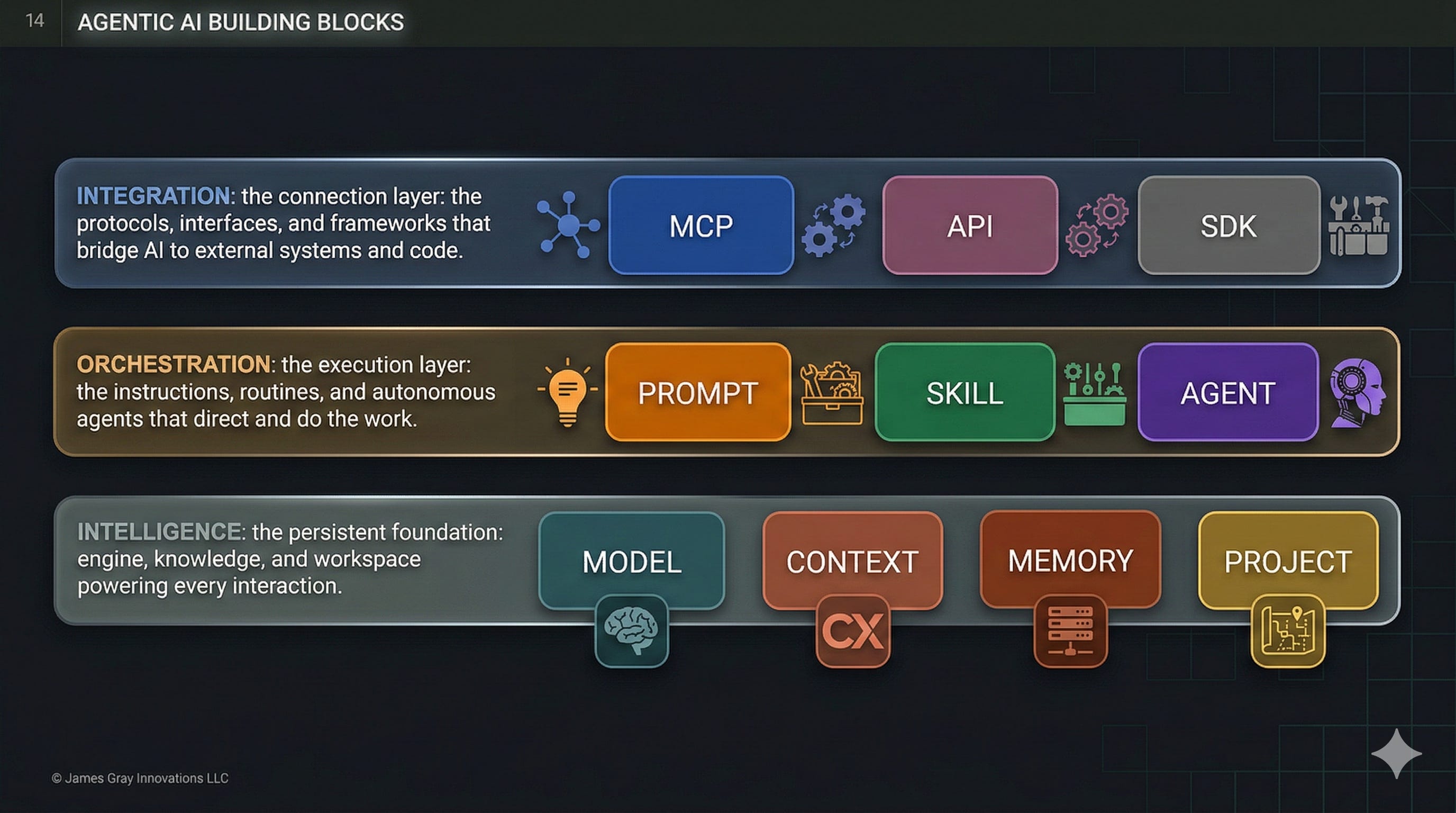
Intelligence (foundation) — the persistent engine, knowledge, and workspace powering every interaction.
Orchestration (middle) — the instructions, routines, and autonomous agents that direct and do the work.
Integration (top) — the protocols, interfaces, and frameworks that bridge AI to external systems and code.
Think of it like a building. Intelligence is the foundation and utilities. Orchestration is the people and processes inside. Integration is the doors, windows, and connections to the outside world.
Let’s walk through each block with real examples you can apply this week.
Layer 1: Intelligence (The Foundation)
These four blocks are the persistent infrastructure beneath every AI interaction.
1. Model
The AI engine — a system trained on data that takes input and produces output through learned patterns.
Choosing the wrong model is like hiring a senior architect to answer the front desk phone. You waste money on overkill or get poor results from underkill. The key decision is always speed vs. depth vs. cost.
Use a fast model (Claude Haiku, Gemini Flash) to auto-tag 500 support tickets overnight — cheap and fast. Use a reasoning model (ChatGPT, Claude Opus, Gemini Pro) to analyze patterns across those tickets and recommend process changes — slower and more expensive, but worth it for strategic insight.
Try this: Pick one recurring task and ask — am I using the right model tier? Most people default to the most powerful model for everything. That’s like taking a helicopter to the grocery store.
2. Context
This is the one that separates useful AI from impressive-but-useless AI.
Context is the unique knowledge your workflow requires that isn’t baked into the model — your files, docs, databases, proprietary data. It comes in three forms: uploaded files (PDFs, spreadsheets), referenced documents (Google Docs, Notion pages), and connected data (databases, live systems).
Here’s the test: “Analyze recurring themes in customer feedback and suggest which product feature to prioritize next quarter.” Generic prompt, generic answer. Now add your last three quarterly reports as uploaded PDFs. Completely different output — grounded in your reality, not the model’s training data.
I see this gap constantly in executive education. People complain that AI gives them “generic” answers. Nine times out of ten, they haven’t given it anything specific to work with. Context is the fix.
Try this: If you’re trying to find customers for your business, write up your buyer persona in a markdown file — who they are, what they care about, what problems they’re solving. Now attach that file any time you ask AI to draft outreach, write copy, or brainstorm campaigns. Same file, every time, dramatically better output.
3. Memory
Memory is what turns AI from a stranger into a colleague who knows how you work.
After several sessions, your AI assistant remembers that you structure reports as executive summaries. It knows you prefer bullet points over paragraphs. It recalls that your team uses OKRs, not KPIs. You didn’t configure any of this. It learned from working with you. Claude, ChatGPT, and Gemini all support memory — the implementations differ, but the concept is the same.
People confuse Memory and Context constantly. Here’s the distinction: you curate context (you choose which files to upload). The system curates memory (it observes your patterns and stores them automatically). One is your briefcase. The other is institutional knowledge.
Try this: Use the same AI tool for 3-4 sessions this week. Then ask: “What have you learned about my preferences?” The answer reveals how memory compounds with use. And here’s a trick — you don’t have to wait for the AI to pick up on patterns organically. You can tell it directly: “Remember that my team reports on a quarterly cadence” or “Remember that I prefer concise executive summaries over detailed narratives.” That fact gets stored in memory and applied in future sessions.
4. Project
If you’ve ever started a new AI conversation and spent the first five minutes re-explaining who you are and how you work — you need a Project.
Projects are self-contained workspaces with their own chat histories, knowledge bases, and custom instructions. Think of them as folders that actively shape the AI’s behavior. Create a “Q4 Investor Updates” project, upload your financial data and competitive landscape docs, set the tone and format rules once — and every conversation in that workspace inherits it all.
The killer feature is isolation. Your investor update project doesn’t leak into your marketing project. Different rules, different context, different memory — same tool.
Try this: Identify the AI workflow where you paste the same instructions every time. Create a Project for it — add your custom instructions, upload the files you always reference, and set the rules once. Next conversation in that workspace, notice how much setup time disappears.
Layer 2: Orchestration (The Execution Layer)
This is where work actually gets done. Three blocks that range from simple instructions to autonomous execution.
5. Prompt
Everyone knows this one. Natural language instructions you provide during a conversation — ephemeral, conversational, reactive.
“Review this customer email and suggest three response options: 1) Apologetic and immediate, 2) Professional and measured, 3) Empowered with alternatives.” That’s a prompt. Close the chat and it’s gone. For a one-off request, it’s the right tool.
The mistake people make isn’t at the prompt level — it’s staying there too long. If you find yourself writing the same prompt for the third time, you’ve outgrown this building block.
Try this: Start saving your best prompts as markdown files. The ones that produce great results — save them, refine them, reuse them. This simple habit is the first step toward Skills, which is exactly where we’re headed next.
6. Skill
This is the building block I’m most passionate about, because it’s where most people get the biggest immediate ROI.
A Skill is a reusable instruction package that an AI discovers and loads dynamically when relevant. Think of skills as training manuals, not employees — they teach the AI how to do something without executing autonomously. They’re portable, composable, and loaded progressively.
Here’s what that looks like: you say “Research our competitor Acme and write a competitive brief aligned with my brand guidelines.” The AI discovers the relevant skills on its own — researching-competitors, writing-competitive-brief, applying-brand-guidelines — and loads them. You didn’t tell it which skills to use. It figured that out from the request.
I run my entire content operation this way. I have 68 skills that handle everything from writing LinkedIn posts to preparing cohort sessions. Each one encodes the best practices, templates, and quality standards I’d otherwise have to re-explain every time. Write it once, reuse it everywhere.
Try this: Next time you’re about to work on something you do repeatedly — a weekly report, a client proposal, a content brief — pause and ask AI to help you codify it. “Help me turn this into a repeatable how-to manual with steps, quality criteria, and examples of good output.” That manual is your first Skill. Every time you do that task going forward, it gets faster and more consistent.
7. Agent
Agents are where the hype lives — and where the most misunderstanding happens.
An agent is a system where an LLM controls workflow execution to achieve a goal. It plans, uses tools, reflects on progress, and operates with varying autonomy: semi-autonomous (proposes steps, you approve), autonomous (executes fully, reports when done), or continuous (runs on a schedule without being asked).
The best way to understand agents is to contrast them with skills using the same task:
With a Skill: “Write a LinkedIn post about AI building blocks.” The skill loads your brand voice, post structure, and engagement hooks. It produces the post. You review and publish. The skill didn’t decide to write a post — you did.
With an Agent: “Promote this week’s newsletter across my social channels.” The agent reads the newsletter, decides which platforms to target, identifies the key angles for each, invokes the LinkedIn writing skill for LinkedIn, the X writing skill for X, and drafts all the posts. The agent decided what to do and orchestrated the skills to do it.
Skills teach HOW. Agents EXECUTE. Together they’re the core of the orchestration layer.
I’ll be direct about something: more autonomy isn’t always better. I’ve watched teams spend weeks building autonomous agents for tasks that a simple deterministic workflow would handle in an afternoon. Match the autonomy level to the complexity of the task, not to what sounds most impressive in a demo.
Try this: Create a simple agent as a markdown file. Define its role, the skills it can use, and the task it handles — something like a “Weekly Report Agent” that gathers data, applies your formatting standards, and drafts the report. On platforms like Claude, these markdown-based sub-agents can perform actions, invoke skills, and even coordinate with other agents. No code required — just a well-structured file.
Layer 3: Integration (The Connection Layer)
The first seven blocks can all live inside a chat window. These last three are how AI breaks out of that window and operates inside your actual business systems. For many leaders, this is where the ROI conversation gets real.
8. MCP (Model Context Protocol)
Think of MCP as “USB for AI” — an open standard that lets AI assistants read from and write to your external systems.
Before MCP, AI lived in a chat bubble. You’d copy data from Notion, paste it into the chat, get a result, then copy it back. MCP eliminates that friction. Now AI can check your calendar, update your CRM, post to Slack, and query your database — all within a single conversation.
MCP connections come in three flavors: data sources (read from databases, docs, wikis), action tools (create tasks, send emails, update records), and real-time systems (live data feeds, webhooks).
Here’s a nuance people miss: MCP and Skills serve different purposes. Skills teach the AI what to do. MCP gives the AI access to do it. A “Schedule Team Meeting” agent needs MCP connections to Google Calendar, Slack, and Notion — plus a Skill that teaches it your meeting scheduling preferences. The blocks are designed to work together.
Try this: List the 3 external systems you interact with most during AI workflows. Anywhere you’re manually copying data in and out is an MCP candidate.
9. API
The programmatic interface for accessing AI models from code — stateless, programmable, usage-based. Every AI product you use — from ChatGPT to your favorite writing tool — is built on an API. When you outgrow the chat window and need AI as a service inside your own systems, this is the building block.
A concrete example: a script calls an AI API (Claude, OpenAI, Gemini) to classify 1,000 customer support tickets overnight. Each ticket gets a category, priority, and suggested response. No human in the loop. Cost: a few dollars for work that would take a team member two full days.
Here’s what’s changed recently: you no longer need to be a developer to use APIs. Agentic coding tools like Claude Code and OpenAI Codex let you describe what you want in plain language, and the AI writes and runs the code for you. The API is the building block. The coding tool is how non-developers access it.
Try this: Think of a system you need to access programmatically but don’t know how to call the API — maybe pulling data from your CRM, syncing records between tools, or automating a report. Open an agentic coding tool like Cursor, Claude Code, or OpenAI Codex and describe what you need: “Write a script that pulls all deals closed this month from HubSpot and formats them as a CSV.” The coding tool builds the API integration for you. You don’t need to know the API — you just need to know what you want.
10. SDK
SDKs sit on top of APIs and add the orchestration plumbing — agent loops, tool calling, error recovery, multi-agent coordination. If the API is a raw interface (send request, get response), the SDK is a framework that handles the patterns you’d otherwise build yourself.
Example: using an agent SDK (Anthropic’s Agent SDK, OpenAI’s Agents SDK, or Google’s ADK) to build a research agent that searches the web, reads PDFs, cross-references sources, and produces a structured report. The SDK handles orchestration, iteration, and error recovery. You focus on defining outcomes.
Same story as APIs — you don’t need to be a developer. The same agentic coding tools that unlock APIs also unlock SDKs. Describe the agent you want to build — its goal, tools, and workflow — and let Claude Code or Codex scaffold it. You define the strategy; the coding tool handles the implementation.
Try this: Open an agentic coding tool and describe a simple agent: “Build me an agent that reads a CSV of customer feedback, categorizes each entry, and writes a summary report.” Watch how fast the SDK goes from concept to working prototype.
How Building Blocks Compose
You don’t use all 10 blocks. You compose the ones your workflow needs — and knowing the right combination is the real skill.
Prompt + Context — The starter combo. You provide instructions and the knowledge AI needs. Handles most one-off tasks: writing, analysis, summarization. This is where 80% of people stop, and for many tasks, it’s enough.
Prompt + Context + Skill — Add repeatability. Instead of crafting the same long prompt every time, the Skill encodes your best practices. Same quality, every time, without the setup tax.
Skill + Agent — The orchestration duo. The agent decides what to do; skills teach it how. An agent writing a newsletter might invoke a research skill, a brand voice skill, and a formatting skill — all without you specifying which ones.
Skill + Agent + MCP — Add real-world connectivity. The agent can now read from and write to external systems. This is where AI workflows start replacing manual processes end-to-end.
Where People Get Tripped Up
I’ll share the patterns I see repeatedly in my courses and consulting work, because they’ll save you time.
The biggest one: treating agents as the default. More autonomy adds complexity, latency, and cost. A deterministic workflow for predictable tasks is faster, cheaper, and more reliable. I’ve watched teams spend six figures building an autonomous agent when a 20-line script would have done the job. Match autonomy to the task, not to the hype.
The second: confusing Memory and Context. This trips up nearly everyone. Context is knowledge you provide. Memory is knowledge the AI accumulates from working with you. They solve different problems, and mixing them up leads to workflows that re-upload documents the AI should already know — or expect the AI to remember files you never shared.
Third: dismissing Skills as “fancy prompts.” They’re not. Skills are portable, reusable instruction packages with templates, examples, and quality criteria. Prompts are ephemeral. The difference is the difference between a recipe card and a cooking class.
And finally: assuming you need all 10 blocks. Most workflows need 2-4. Starting with Prompt + Context and adding blocks as complexity demands is almost always the right approach. Over-engineering a simple task is worse than under-engineering a complex one.
Your Action Plan
You don’t need to master all 10 blocks. Start where you are:
If you’re using AI for one-off tasks — You’re at Prompt + Context. That’s a solid foundation. Focus on improving your context quality (better files, clearer instructions) before adding more blocks.
If you’re repeating the same prompts — You’re ready for Skills. Convert your best prompts into reusable instruction packages. This single step eliminates the most common source of inconsistent AI output.
If you’re managing multi-step workflows — You’re ready for Agents. Start with semi-autonomous (agent proposes, you approve) before moving to fully autonomous. Build trust incrementally.
If you’re manually copying data between AI and tools — You’re ready for MCP. Connect your most-used systems and watch the copy-paste tax disappear.
If you’re processing data at scale — You’re ready for APIs and SDKs. Move from chat-based interaction to programmatic access.
The framework isn’t a ladder you climb from bottom to top. It’s a toolkit you draw from based on the job in front of you.
Explore each block in detail. The Hands-on AI Cookbook has a dedicated Agentic AI Building Blocks section with guides, comparison tables, and a “Which block should I use?” decision guide for each of the ten blocks.
The building blocks give you the vocabulary. But the real leverage comes from your judgment — knowing which blocks to compose, when to add autonomy, and when to keep it simple. AI amplifies the clarity you bring to it.
Stay curious. Stay hands-on.
James
Ready to build, not just read? In my Maven courses, we don’t just learn the building blocks — we build with them. Students walk away with AI-powered workflows that accelerate business value.
Great article, nothing but clarity! Thank you.