


My business runs on 69 workflows. If you asked me to list them, I’d get through about eight before I had to look.
Nobody can hold that many in their head, so I stopped trying. My AI and I keep them all in one place, and I look there.
That place is my AI Registry. It’s the thing I open most days, and it’s one of my favorite things to teach. Here’s how it works and how I use it.
TL;DR
Workflows multiply once you work with AI, and nobody can track them from memory.
An AI Registry catalogs them in three levels: line of business, process, workflow. Each workflow has a status and lists the skills and agents that power it.
The pages link to each other, and those links are what make the registry useful to your AI.
I’m walking through mine live, free, on Thursday, October 22.
Name the work first
Once you work with AI, workflows multiply. Email triage, sales pipeline review, coaching session prep.
Each one is a piece of how your business creates value. Unless you capture it somewhere, it lives in your head, and know-how in your head can’t be improved, delegated, or handed to a new hire. Your AI can’t build on it either.
Naming the work also clarifies it: what you actually do, how the pieces link together, and what outcomes they produce. AI tools matter, but they create real impact only when they’re attached to named work and connected to an outcome. Get clear on the work first, and AI can help you build it.
Whether you work alone or lead a team, the result is an institutional record of what you do and how you do it.
So before I build anything, my AI and I name and catalog the work. I don’t write the pages by hand. My AI drafts them with me as we go, and I check that they say what I mean.
What the registry records
My registry is a folder of plain Markdown pages. Three levels form its spine, and each one orders the level beneath it:
Line of business. What do we offer? Mine are Consulting, Learning, and Coaching, plus shared operations.
Process. What do we do, and why? Lead Generation, Course Delivery, Student Support.
Workflow. How do we do it? One page per workflow, with its status and the skills and agents that power it.
Here’s one thread through mine, top to bottom:
Learning (line of business) → Lead Generation (process, owned by my Marketing function) → LinkedIn Prospect Research (workflow), whose page lists the agent that does the research.
Skills and agents don’t get pages of their own. A workflow page links to them where they live, so there’s never a stale second copy.
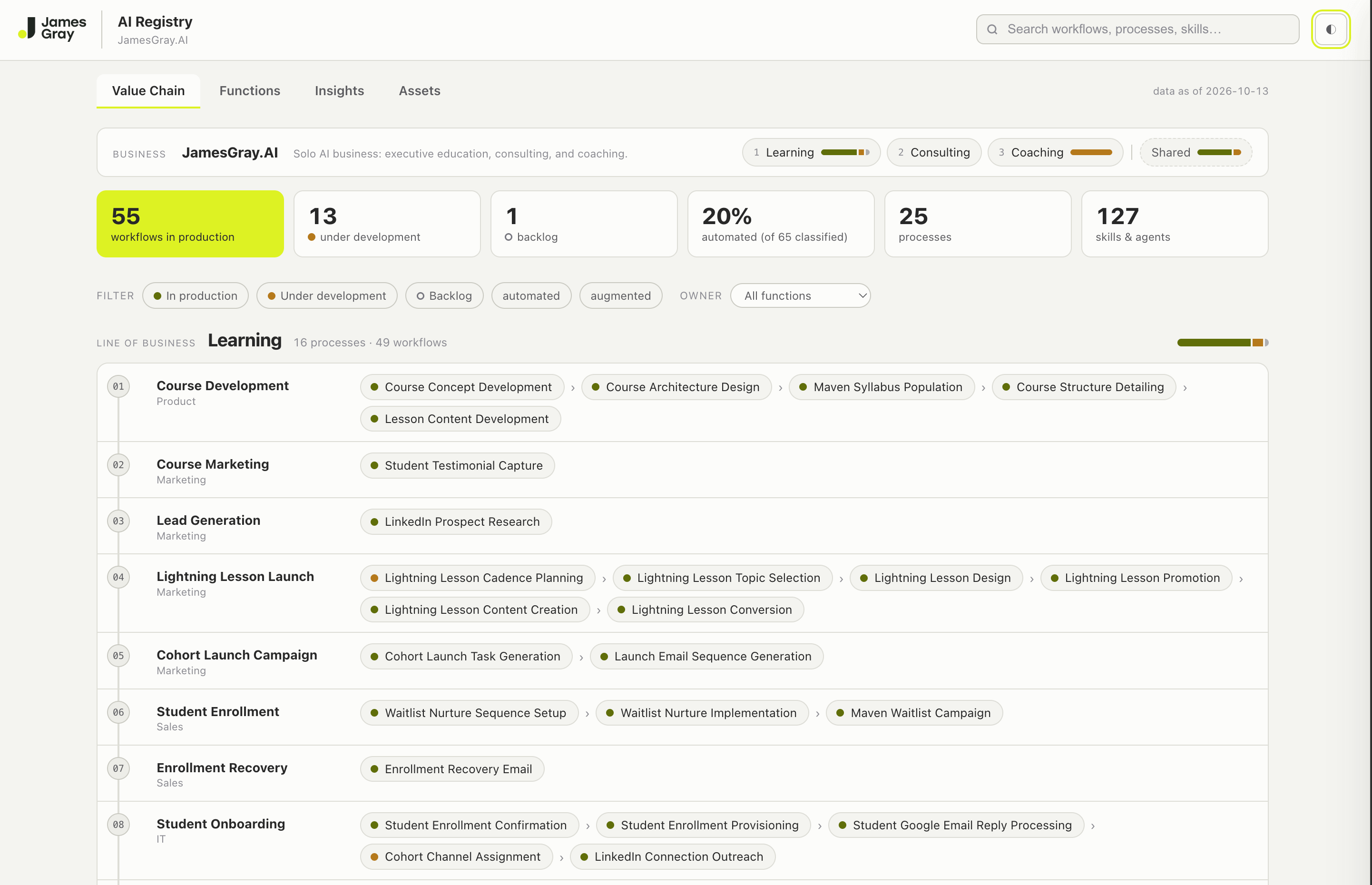
What one page shows me
At first glance, the registry reads as one page. Top to bottom, it’s a value chain: what I offer, the processes that deliver it, and the workflows inside each one. As of this week:
25 processes and 69 workflows. The whole business in one view.
55 in production, 13 under development, 1 in backlog. Every build has a place and a status, so “where are we?” has an answer without a status meeting.
37 skills and agents that no workflow references yet. A check I run against the registry finds them. Each one raises a useful question: which workflow does this serve? I couldn’t see any of them before the map existed.
One process with no workflows at all. An empty process is where my next build idea usually comes from.
If you lead a team
Leaders get asked three questions about AI. Where are we using it? What breaks if this tool or vendor changes? Which processes should we invest in next? A registry scoped to the part of the organization you lead answers all three, and because it’s a record rather than someone’s memory, it stays when people move on.
How I actually use it
A few habits, since this is the part people ask about most:
New work starts as a registry page. When I have an idea for a workflow, my AI writes it into the registry as a backlog page before anything gets built. Then it has an address from day one.
Status changes as the build moves. When a workflow ships, its page moves to in-production. The page always says where things stand.
A weekly sweep catches what I missed. An agent scans what I’ve built and flags anything that isn’t in the registry yet, so nothing drifts out of view.
None of this takes much time, because my AI does the writing. My part is the judgment: naming the work well and deciding what’s worth building.
Why your AI should read it too
The registry is plain Markdown, so any AI that can open a folder can read it: Claude, ChatGPT, M365 Copilot, or Gemini.
Underneath the one page, every page links to the others: each workflow to its process and its outcome, and to the skills and agents behind it. Those links are the real value. My AI follows them, which turns the registry into context about my business.
So when I ask, “Given how my business runs, which workflow should I design next to strengthen Lead Generation, and why?”, the answer cites my own pages and proposes something that fits beside what’s already there. Without the registry, the same question gets generic advice. With it, the AI proposes, and I decide.
See mine, live
If you’d like to watch this in action, I’m teaching a free 45-minute Lightning Lesson on Maven on Thursday, October 22: Map Every Workflow You Run on One Page.
I’ll open my registry, trace one workflow up to the outcome it serves, and ask my AI which workflow to design next. Then I’ll show you a small first registry and how my AI and I set one up. You don’t need 69 workflows to start: one line of business and the work inside it is enough.
The last fifteen minutes are for your questions, and everyone who registers gets the recording.
Bring a line of business you’d like to map. We’ll start there in the Q&A.
Stay curious. Stay hands-on.
James