


Someone asks what you charged a client like this one. The answer exists. It’s in a proposal you wrote eight months ago, in a Slack thread, and in your head.
So you open Claude, and Claude knows nothing about any of it. You paste in three documents and explain the background again. You get a good answer. You close the tab, and every bit of judgment that went into that conversation evaporates.
Tomorrow you do it again.
I did this for two years. It isn’t about being organized enough. Claude has no memory of your business, so you supply it by hand, every time. The models got dramatically better every quarter. That part never changed.
The fix has two halves, and neither of them is a product.
The first half is a pattern, published by Andrej Karpathy, a founding member of OpenAI, formerly director of AI at Tesla, and now leading pretraining research at Anthropic, in what he calls an “idea file”. He named it the LLM wiki. A wiki is just a set of cross-linked pages, like Wikipedia, and this one answers the question every knowledge base eventually runs into: who keeps this current?
The second half is a standard. Google published the Open Knowledge Format, or OKF, and it answers the question that decides whether the thing you build is still useful in three years: what shape do you write it in? Every team solving this problem today invents its own private notes format. None of them travel. OKF is the agreed shape — published openly, free to use, and implementable by anyone without asking permission, because it is four rules about plain text files.
You need both. The pattern without the standard gives you a knowledge base trapped inside whichever tool you happened to start in. The standard without the pattern gives you a beautifully specified folder that’s still yours to keep current, which is the part you don’t have time for.
Together you get something genuinely rare in this market: a knowledge base that compounds instead of resetting, and that stays readable without any vendor’s software.
I run two knowledge bases on this standard. One holds the 333 pages behind my courses. The other holds 104 pages describing how my business actually operates. Both are plain text files in a folder. Neither one took a weekend to get started.
Here is the whole thing, both halves.
TL;DR:
A knowledge graph is one file per thing, with ordinary links between them. There is no further structure to learn.
Attaching files to a chat makes Claude rediscover your business every time. A knowledge graph makes it read what it already worked out.
Karpathy’s insight: wikis stall because the bookkeeping is boring, and boredom is a human constraint. An LLM doesn’t get bored. That constraint is gone.
It’s built in three layers: raw sources Claude never edits, the pages Claude writes, and a rulebook that disciplines the writing.
You only ever do three things with it: ingest a document, query the graph, lint what’s gone stale.
Build it on the OKF standard, and it’s portable by construction. Plain files keep it alive; the standard makes it travel. The conformance bar is one required field per file, so it costs you nothing.
This Thursday I’m demoing all of this live: two working knowledge bases, one real question, 45 minutes, free. Model Your Business as a Knowledge Graph for AI. If you’d rather watch it work before reading about it, start there and come back.
A graph is things plus relationships
The thing you’re building has a name: a knowledge graph. The definition is one sentence long, and the rest of this post follows from it.
A knowledge graph is things and the relationships between them. Everything gets its own page. Every relationship is a link from one page to another. The web of pages and links is the graph. That’s the entire definition.
Wikipedia works this way. You land on one page; the words inside it link to other pages, and you follow the ones that matter to your question. Claude reads your knowledge base exactly the same way. It lands on the page that matters and follows the links out of it.
You run your business this way too, whether or not you’ve ever called it a graph. Read this sentence, which could have come out of any account review:
Northwind Manufacturing is a mid-market account owned by Dana Ruiz, which came from the Q3 webinar, is running a pilot, evaluates Atlas Platform, and is blocked by security review.
Six things and five relationships. Northwind is a Company. Dana is a Person. The Q3 webinar is a Campaign. The pilot is a Deal. Atlas Platform is a Product. Security review is a Process. And the words joining them (owned by, came from, is running, evaluates, is blocked by) are the relationships.
Give each of those things its own page. Turn each of those phrases into a link. You have a knowledge graph. That shape was already in the sentence. Naming it is the only thing that changed.
Folders answer “where.” Links answer “how.”
This contrast matters, because most business knowledge is organized in a folder tree today, including mine.
In a folder hierarchy, every file lives in exactly one place, which forces a choice: does the Acme contract go under Clients/Acme/ or Contracts/2026/? Both answers are defensible, which is why the question keeps coming back.
A graph doesn’t make you choose. Acme is one page, and it links to its contract, its three engagements, the two tools you deployed there, and the playbook you used. None of those live inside Acme. You keep your folders exactly as they are. You add links on top.
Types and concepts
One distinction to settle first, because everything downstream depends on it.
Look at the Contacts app on your phone. “Contact” is the type, the kind of entry. The entry for your accountant is a concept, one actual record, filled in.
Your business has both. Client is a type; Acme is a concept. Playbook is a type; the onboarding playbook is a concept. Types are the kinds. Concepts are the real ones.
Two places the Contacts picture stops. Your pages are not forms. The type is a label saying what kind of page this is and nothing more; the body is how you’d describe the thing to a new hire, under whatever headings suit it. And unlike Contacts, your pages link to each other.
Four words, no synonyms
Concept. One page, one file, one thing.
Type. The kind of concept. A label, not a form.
Link. A relationship between two concepts.
Graph. All your concepts plus their links.
Markdown and frontmatter, in two minutes
Two file conventions, and then you can read any of these files you ever meet.
Markdown is plain text with light formatting. A # at the start of a line makes a heading. **bold** makes bold. [text](path) makes a link. That’s most of it. It opens in any text editor, on any computer, forever. A file ending in .md is a Markdown file.
Frontmatter is a few name: value lines fenced between --- markers at the very top. Think of a contact card. Frontmatter is the labeled slots at the top (name, phone, email). The body below is the free-text notes.
Only type is ever required. title, description, and tags are optional extras, and they earn their place for one reason: they let Claude list, search, and preview a page without opening it.
A three-page graph
Before a big one, look at a minimal one. Say you run a solo consulting practice. Three concepts, three files:
knowledge/
  clients/acme.md
  engagements/acme-ai-roadmap.md
  playbooks/kickoff-checklist.md
And inside engagements/acme-ai-roadmap.md:
---
type: Engagement
title: Acme AI Roadmap
description: Six-week roadmap engagement, Q1 2026.
tags: [active, roadmap]
---
# What we are doing
Six-week roadmap engagement for [Acme](/clients/acme.md),
run off the [kickoff checklist](/playbooks/kickoff-checklist.md).

# Where it stands
Discovery interviews done. Draft roadmap due 14 March.
Dana wants the security review resolved before we present.
Look at what that file is made of. Four labeled lines at the top are the frontmatter. Everything below is ordinary writing under headings you chose. # What we are doing and # Where it stands are not required by anything. They’re just how you’d explain this engagement to a new hire. Another page might use entirely different headings.
And two ordinary phrases are links, written the way any markdown link is written: square brackets around the words you read, parentheses around the page they point to.
[Acme](/clients/acme.md) shows the word Acme and points at the Acme page. [kickoff checklist](/playbooks/kickoff-checklist.md) shows kickoff checklist and points at the playbook. Two links, sitting inside a normal sentence. That’s what makes this a graph, not a document.
The / at the front of each link means “start from the top of this knowledge base.” Not the top of your hard drive, and not a web address. /clients/acme.md reads as the acme.md page in the clients folder of this knowledge base, and it means the same thing written from any page, however deeply buried. That’s what keeps a link working when the page it points to moves.
One thing to expect the first time you open these files. This link style is the form the standard recommends, and Claude resolves it correctly because your rulebook tells it where the top of the knowledge base is. Your text editor and GitHub don’t know that, so a preview pane may not turn these into clickable links. Nothing is broken. The reader that matters here is the model.
Three files, two links. Now ask the question that used to cost you an afternoon: where does the Acme engagement live? The folder answers where (under engagements/). The links answer how it’s connected (to the client it’s for, and the playbook it runs off).
Then ask one more: which of my playbooks has Acme seen?
No single page holds that answer. It lives in the links, and Claude assembles it by following them. Hold onto that question. It’s the whole point, and I’ll come back to it.
Three types are smaller than you’ll build. Yours will start at four to seven. The 333-page knowledge base that runs my courses is this exact shape, repeated.
One thing worth knowing now rather than later: that three-file example is already a conformant open-standard bundle. Not “roughly like” one. More on that shortly. You had to adopt nothing to get there, which is the strongest argument for the standard.
Why knowledge bases die
The reason to care about any of this is not the shape. It’s who keeps it current.
Karpathy’s argument starts with a familiar failure. Wikis and shared knowledge bases die. They die not because the idea was wrong, but because, in his words, “the tedious part of maintaining a knowledge base is not the reading or the thinking, it’s the bookkeeping.”
Somebody has to file the new document, update the four pages it contradicts, and fix the cross-references. Humans get bored and stop. The wiki rots, everyone goes back to searching their email, and eighteen months later someone proposes building a wiki.
An LLM does not get bored. It will update fifteen cross-linked pages in one pass, at 11pm, for the hundredth time, with the same care as the first. The maintenance burden that killed every wiki is the exact constraint that just got removed.
That’s the whole shift, and it’s worth sitting with. A decade of dead wikis taught people that a shared knowledge base is not worth starting. That was a fair reading of the evidence at the time. The evidence changed. (His note is a fifteen-minute read and worth it in full.)
Concretely: the folder still says the Acme engagement ends in March. The graph got updated in October, when you told Claude it had been extended. A folder of documents is storage. A graph someone keeps current is knowledge.
Why this isn’t the same as attaching files to a chat
Attaching files to a chat, or pointing an AI tool at a folder to search, is the common approach. It works. I’m not going to pretend otherwise.
But nothing accumulates. Each question sends Claude back to the original documents to find the relevant passages and work out an answer from them. When the conversation ends, that thinking is gone. Ask a related question next month, and the same work happens again, from the same raw documents, at the same cost, with no memory that you ever asked.
The LLM wiki inverts it. Each source is read once, filed into the pages it affects, and cross-linked, with contradictions flagged as they surface. Built once and kept current, rather than rediscovered every time.
That’s what “compounds” means in practice. It’s why a graph gets better the longer you use it, while a folder of documents just gets bigger.
It is worth being precise here, because a technical colleague will ask. Both approaches retrieve. Claude reads my index and opens the pages a question needs, and that is retrieval by any definition. The difference isn’t retrieval; it’s whether the thinking gets kept. Search-every-time systems have a name: RAG, retrieval-augmented generation. They re-derive the answer from the source documents each time, and discard the derivation when the chat ends. The wiki writes the derivation down on the page it belongs to, so the next question starts from it instead of redoing it.
Founder Lens
Build, not buy. There’s a wave of AI knowledge products arriving, and the good ones are genuinely good: real retrieval, real permissions, connectors into everything you already run. That isn’t the question. The question is where your operating knowledge ends up living. How you price, what you’ve learned works, why you do it this way rather than that way — that’s your intellectual property, and it scatters across chat histories, uploaded files, and whatever each platform decided to keep. Scattered isn’t an asset. And once it’s inside a product, the vendor sets your exit costs. Plain markdown in a folder you own works in any AI tool or platform you point at it today, works in whatever you’re using in 2028, and moves to another machine by copying a directory. The advantage here is the format, and the format is free.
Architecture: three layers
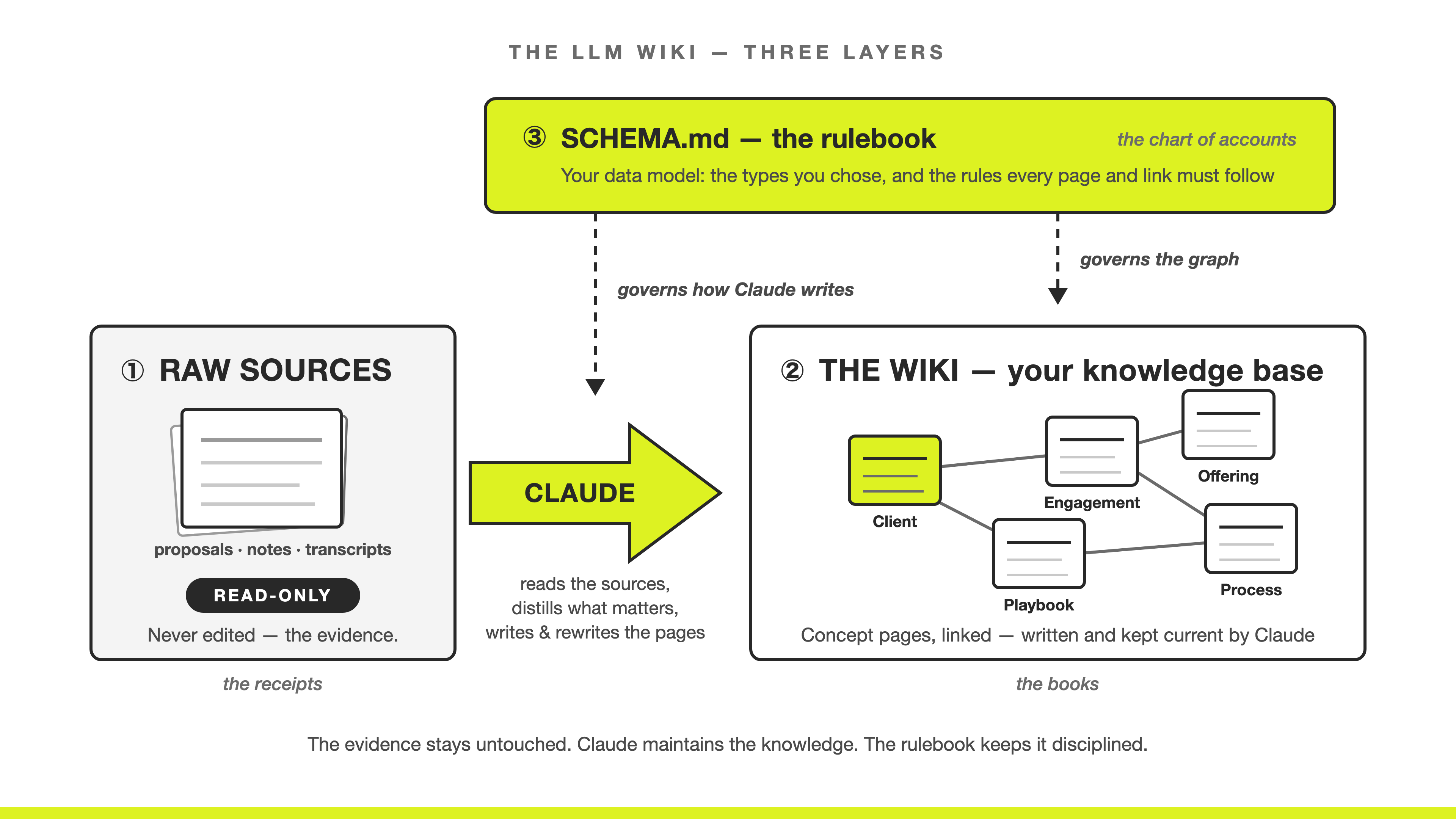
Keeping these separate is what makes the pattern work rather than degenerate into a folder of AI-generated sludge. If you’ve ever had a bookkeeper, you already know the shape.
1. Raw sources, read-only. Your actual documents: contracts, transcripts, reports, notes. These are the receipts and bank statements. You never alter a receipt, and that is exactly what makes it worth having. Claude reads them and never edits them. They are evidence.
2. The wiki, Claude’s layer. The concept pages, written and rewritten by Claude from the raw sources. These are the books your bookkeeper keeps. This is distilled knowledge, not evidence, which is precisely why it’s safe to let Claude rewrite it. The receipts are still there to check it against.
3. The schema, the rulebook. A file that says how the wiki is organized and what the conventions are. This is the chart of accounts: the agreed list of what goes where, written down before the entries are made.
Karpathy’s point about that third layer matters most. The schema is what makes the model a disciplined wiki maintainer rather than a generic chatbot. Without it, every session invents its own filing system, and six weeks later you have four naming conventions and no way to query anything.
The three layers. Raw sources stay untouched. Claude reads them, distills what matters, and writes the pages. The rulebook governs both sides.
A note on filenames, so you’re not confused later. Karpathy puts these rules in the file the AI tool already reads at startup: CLAUDE.md for Claude Code, AGENTS.md for other tools. I use two files instead. A SCHEMA.md holds the actual rules, and a short CLAUDE.md tells every future session to go read it. Same layer, split in two, for a practical reason: the rules are something you’ll read and revise yourself, and they’re easier to find in a file named after what it contains.
Operations: three of them, and that’s all
These three are all you ever do. Not just while you set the knowledge base up: a year in, running it still means only these three.
Ingest. Hand Claude a new document. It folds what matters into the pages that already exist rather than dropping another file on a pile. You hand your bookkeeper a receipt; they don’t file it in a drawer, they post it, and the balances change.
Query. Ask the graph a question. Claude answers from the pages and cites which ones it used, so you can check it. That includes questions whose answer sits on no single page and has to be assembled across links. And when an answer took real work to assemble, it gets filed back as a page of its own — which is how a question you asked once stops being a question.
Lint. Claude proofreads the entire graph against your rulebook, hunting four things specifically: pages that contradict each other, claims that have quietly gone stale, orphans nothing links to, and links that should exist and don’t. It reports; you decide what gets fixed. A few minutes a week, and it is what keeps the other two trustworthy as the graph grows.
Ingest, query, lint. Running these three is the only maintenance your knowledge base needs.
That’s the first half. Things and links, three layers, three operations.
The second half: an open standard, not a product
Everything above tells you how a knowledge base stays alive. It doesn’t tell you what shape to write it in, and that turns out to matter just as much.
Here’s the problem Google set out to fix. What AI agents most lack is internal knowledge. What a metric means in your company. Why something is done a particular way. Which client the rules apply to. Every team that solves this builds its own private notes files. Those files all look broadly similar, and none of them were designed to work together, so nothing travels. Every new tool starts the collection work over, and every vendor that offers to help would prefer the knowledge live in their database.
The Open Knowledge Format is the response, and what matters is what it is not. It’s not a product, a platform, a repository, or a service. It’s an agreed shape for these knowledge bases. Plain files anyone can write, and any agent can read, with nothing proprietary in between. Closer to what CSV is for tabular data than to anything you would buy: no vendor, no runtime, and every tool already reads it.
The specification is deliberately small, and most of it is already above:
A bundle is a folder of markdown files.
One concept per file.
A
typein the frontmatter.Ordinary markdown links connecting the pages.
That’s it. That’s the shape you read in the three-file example, which means the cost of building to the standard rather than to your own private convention is approximately zero.
What you get for that zero: your knowledge works in any AI tool you point at it today, in whatever you’re using in 2028, and on a colleague’s machine when you hand them the folder. You are not building inside a product that can change its mind about your pricing tier, get acquired, or sunset the export button.
Be precise about what’s doing the work there, because it changes how much weight to put on the standard. The durability comes from plain markdown in a folder you own — that would still be true if OKF disappeared tomorrow. What the standard adds is interoperability: your bundle and someone else’s have the same shape, so a tool written against one reads the other, and an agent that has never seen your business knows how to walk your files.
One caveat you'll hit within ten minutes of opening the spec: OKF is early. It is at version 0.2, published by Google in a public repository, with no formal governance body behind it yet. That is also why my instructions to Claude point to the published spec and ask it to read the current version rather than pinning one—I want today’s rules, not the ones that were current when I set up. Point at the source, and carry a short fallback summary for when it can’t reach the page. If the standard moves, my files don’t. Only the rules Claude checks them against do.
That’s why I run both of my bundles on it, and why I check the spec before I change either one’s structure. The pattern keeps it current. The plain files are why it stays mine. The standard is why it travels.
Spec, if you want to read it: Open Knowledge Format.
You choose the types
There’s one thing worth pulling out of the specification, because it’s the part that decides whether this works for your business.
OKF hands you no vocabulary. It asks for that one type field and does not tell you what the types may be. You choose those, and any tool reading your bundle must cope with types it has never seen before. Nobody decides whether Playbook or Engagement is a legitimate kind of thing in your business except you.
That’s worth more than it sounds. A fixed taxonomy that can’t hold a new kind of thing is where structured knowledge systems tend to break down, a few months in, once real work starts arriving. OKF avoids that by declining to define the taxonomy at all.
Here’s what that looks like in practice. My two bundles run on the same standard. The one behind my courses uses these types:
Course · Week · Session · Module · Lesson · ProjectThe one that runs my operations uses these:
LineOfBusiness · Function · Process · Workflow · NoteSame standard, same file shapes, same three operations. Entirely different types, because a teaching business and the operation behind it are made of different things. Neither list was approved by anyone. Yours will be a third list, and it should be.
Those six carry the teaching content. That bundle runs thirteen types today: cohorts, post-course reviews, and improvement items all eventually needed pages of their own. Every one arrived because real work showed up with nowhere to live, which is the only good reason to add a type.
The rulebook, in plain language
“Schema” sounds far more technical than it is. Here’s the core of mine, trimmed to the types that carry the teaching content:
Types and directories
  courses/     Course
  weeks/       Week
  sessions/    Session
  lessons/     Lesson
  projects/    Project

Plural folders, singular type names.
Every page carries a title, a description, and a date. No exceptions.
One style of link, so nothing breaks.
Four house rules: which kinds of pages exist, which folder each kind lives in, what every page must carry, and how pages point at each other.
Write that once, and every page Claude creates afterward follows it. Across 333 pages I have reorganized plenty — lessons move between weeks, whole modules get resequenced, a migration once decomposed a syllabus into eighty pages. I have never had to rewrite the rules themselves, because they were settled before the pages existed. That separation between what moves and what doesn’t is most of what a rulebook is for.
A vague rulebook is what produces a messy knowledge base. This is the file to slow down on, and the one that pays back most. Specifically:
Name the types before you write pages. Start at four to seven. If your first list is already at twelve, two or three of them are probably fields on a page rather than pages of their own. Types earn their way in later, once something real has nowhere to live.
Say what every page must carry. A title and a one-line description is the minimum that makes an index possible.
Pick one link style and write it down. Mixing relative and absolute links is how graphs quietly break when files move.
Say what does not belong. Mine says raw source documents are never edited, and generated files are never hand-written. Constraints prevent more mess than instructions do.
What a query actually looks like
This is the moment worth seeing properly, because it’s the entire reason to do any of this.
Earlier I asked you to hold on to a question: which of my playbooks has Acme seen? Here is that exchange, in the shape you will get:
You: Which of my playbooks has Acme seen? Answer only from my knowledge base, with citations.
Claude: Two. The kickoff checklist, used to run the Acme AI Roadmap engagement, and the discovery interview guide, used on the earlier scoping engagement. The onboarding playbook has not been used with Acme.
Sources: engagements/acme-ai-roadmap.md, engagements/acme-scoping.md, clients/acme.md
Read what had to happen for that answer to exist.
Nowhere in the graph is there a page listing Acme’s playbooks. Claude started at the Acme page, followed the links to both engagements, looked at which playbook each one pointed to, and assembled an answer that had never been written down anywhere.
Then it told you which three pages it used, so you can open them and check.
Three payoffs come out of this, and you’ve just watched the third. Your information gets organized in one place. The relationships become visible instead of remembered. And Claude can derive knowledge that was never written down anywhere: answers assembled across several pages, contradictions between two pages that each look fine alone, patterns across clients that no single page records.
A folder of files cannot answer that question. A graph does, in seconds.
The same question, against a real knowledge base
Acme is invented, so here is the same shape against my operations bundle. The 104-page one. Real pages, real answer.
One of my rules matters for this. In that bundle, a workflow never records its own owner. Ownership lives on the process the workflow belongs to, and functions own processes. I set it up that way on purpose, because writing an owner in two places is how two places end up disagreeing.
Which means this question has no page to read the answer off:
You: Who owns the Course Concept Development workflow? Answer only from my registry, with citations.
Claude: I’ll look up the workflow node in your registry.
Used 6 tools
Owner: the Product function, led by James Gray.
The chain, per your registry’s ownership rule (workflows inherit the owner from their process; processes name a function slug, never a person):
Course Concept Development — the workflow node carries no
owner:field, as designed (registry/workflows/course-concept-development.md)It’s workflow #1 under the Course Development process (LOB: Learning), whose frontmatter reads
owner: product(registry/processes/course-development.md)The Product function’s
lead:is “James Gray” (registry/functions/product.md) — so it’s staffed, not orphanedSources:
registry/workflows/course-concept-development.md
registry/processes/course-development.md
registry/functions/product.md
Three pages, and the answer wasn't on the page you'd open first. Claude says so itself in the first bullet: the workflow node carries no owner field. It went and found the process that lists this workflow, took the owner from there, and resolved that owner to a function. Six tool calls to land on three pages, and it showed its work.
Then it added something I hadn’t asked for. So it’s staffed, not orphaned.
No page in my registry says whether a function is staffed. No such field exists, and I have never marked one. What exists is a single line in my rulebook: a function with no named lead is unstaffed. Written once, never repeated, and never applied to anything — until Claude applied it here, to a function I’d asked about for an entirely different reason.
That is what a rulebook buys you that a folder cannot. One sentence about what an absence means, and every page in the graph quietly acquires a property nobody typed. Ask that same question across every process in the business, and you have a staffing gap report I never wrote, and no page contains.
That’s the difference between storage and knowledge. A folder tells you where a file is. The links tell you who owns the work, and the rulebook tells you which work nobody owns.
The citations are not decoration. They make the answer checkable, and checking one occasionally is the habit that keeps you honest about how much to trust it.
What it costs, what it returns, and where it doesn’t fit
Here is enough detail to decide whether this is worth your time.
Setup. Twenty minutes of thinking, which is the exercise below. Then an hour or so to build the thing, which is the next post. No license, no vendor, no procurement conversation.
Running it. Ingesting a document takes about as long as handing it to someone. Lint is a few minutes a week. Querying is faster than asking the colleague who would know.
Return. The compounding part is hard to put a number on, so here’s the part that isn’t: the question that used to mean an afternoon of digging through old proposals and threads gets answered in seconds, with citations you can open and check. That happens in the first week. After that it keeps improving, because every document you add makes the next answer better.
When it pays off — and when it doesn’t. Not day one. On day one, this is worse than pasting documents into a chat, because the graph is nearly empty and you’re the one filling it. Judge it at week three, not at the end of the first session. If you won’t give it three weeks of real use, don’t start. In week one you are still building the thing, and judging the build tells you nothing about the tool.
Your knowledge stays yours. These are plain files in a folder on your own machine. Nothing gets uploaded into a knowledge platform, no vendor ends up holding your operating knowledge, and Claude reads the files when you ask it to under whatever data terms you already work with. If you can keep a folder of documents, you can keep this.
Where it doesn’t fit. This is not a system of record. It doesn’t replace your CRM, your finance system, or anything carrying an audit requirement. Those hold transactions; the graph holds understanding, and links out to them. It’s also weakest where the knowledge changes hourly. A graph earns its keep on things that stay true for months.
Solo or team. Start solo, because you can, and because the thinking is yours either way. It scales to a team by putting the bundle in a shared repository, with one honest constraint: somebody has to own the rulebook. That’s true of every shared filing convention ever attempted, and this one is no exception.
Lint: the operation that decides whether this survives
“Lint” is a borrowed word. Developers run a “linter,” a tool that automatically checks their work for problems they’d never catch by rereading it.
In a knowledge base, lint means Claude proofreading the whole graph against SCHEMA.md. It finds four things:
Contradictions. Two pages that disagree. One says the engagement ends in March, another says it was extended to October.
Stale claims. Assertions that have quietly gone out of date.
Orphans. Pages nothing links to and that link to nothing. They exist, and no question will ever reach them.
Missing cross-references. Links that should exist and don’t. This one is subtle and it’s where most of the value hides, because a missing link is knowledge you have and cannot get to.
A worked lint inspection: a contradiction between two pages, an orphan nothing links to, and a missing field. Report first. Nothing is rewritten until you approve it.
Two things make lint work.
It reports, it doesn’t rewrite. Problems get flagged, and you decide what gets fixed. Anything else and you’ve built a machine that confidently overwrites your business knowledge while you’re asleep.
It’s only as good as your rulebook. An inspection against a checklist you wrote yourself is exactly as sharp as the checklist. This is the second reason SCHEMA.md is worth reading closely rather than rubber-stamping.
Run lint weekly. It takes a few minutes, and it is the difference between a knowledge base and the ruins of one.
Indexing and logging: two files keep it navigable
As the graph grows, you need a way in and a way back. Two plain files do that job. Both are optional in the standard. Leave them out, and you will end up rebuilding them by hand a few months later.
The index is a contents page. Every page you have, listed in one place, with a one-line summary. In my bundle, that’s an index.md in each folder. Part of my courses index reads:
Courses
  Hands-on Agentic AI for Leaders
    - 4-week Maven course to build, ship and manage AI workflows.
  Agentic AI for Claude Builders
    - 5-week Maven course turning Claude users into Claude builders.
Every page earns exactly one line, and Claude writes it. This answers what do I know?
The index also drives performance. It’s what Claude reads first, so it opens only the pages a question actually needs instead of trawling 333 files. At ten pages this is a nicety. At three hundred, it’s why queries stay fast and cheap.
The log is a running diary. A dated heading, and under it a bullet for each change. In my bundle that’s a log.md at the root:
## 2026-08-03

* **Add**: New lesson: the LLM wiki and the Open Knowledge Format.

## 2026-07-15

* **Migration**: Decomposed course syllabus into 80 pages.
Newest entries at the top. Nothing is ever overwritten. It answers the question the index cannot: how did I get here? Months later you can ask why something changed and get a real answer instead of a guess.
Claude writes and maintains both. You don’t. They describe the graph rather than adding to it, so when you count your concepts, the index and the log don’t count.
What this asks of you
One honest note, because I’d rather say this than let you find it out in month two.
The hard part isn't technical. None of it requires code. The hard part is that a knowledge base makes your thinking legible, first to Claude and then to yourself. Writing down what a “client” is can reveal that the word means something different in sales than in delivery. Defining a process can surface a step whose owner was never actually named.
That’s not a side effect. It’s most of the value. The graph is a mirror before it’s a tool, and that is where most of the return on it comes from.
AI amplifies your judgment. It doesn’t replace the work of developing judgment worth amplifying. A knowledge base makes that work visible.
The vocabulary
Eleven words. Keep them somewhere you can glance at.
Concept. One page, one markdown file, one thing.
Type. The kind of concept. The label, like
Client.Link. A relationship between two concepts.
Graph. All your concepts plus their links.
Schema. The set of types you chose, plus the rules for using them.
SCHEMA.md. The file those rules live in, and the one Claude maintains the graph by.
Bundle. The folder that holds it all. OKF’s word for it.
OKF. Open Knowledge Format. The published shape a bundle takes.
Ingest. Folding a new document into the pages it affects.
Query. Asking the graph a question and getting a cited answer.
Lint. Claude proofreading the graph against the rulebook.
Do this part now, before you build anything
Everything above is the thinking. Here are the twenty minutes that turn it into something you can build from.
No files yet, no tools open, just answers.
Answer five questions. Twenty minutes.
What kinds of things does your business run on? Name four to seven. These are your types.
For each one, name three real examples. Those are your first concepts.
Which relationships between them do you actually reason about? (”This engagement is for that client.”)
What must every page carry? Title, description, and date are a fine answer.
Which documents are your raw sources, and where do they live?
If you can’t name three real examples of a type, it isn’t a type yet. Cut it.
That’s it. No files to create. The next post opens with a prompt that interviews you and writes your SCHEMA.md from what you approve, so the file isn’t your job. The answers are, because that’s the part no prompt can do for you. It isn’t really a filing decision. It’s you saying out loud what your business is made of, and it tends to surface at least one definition worth settling.
Keep what you write. You’ll build on it in the next post.
What happens next
You have the pattern, the standard, and your five answers. The next post builds from them.
Understanding how this works and having it running are different things. This post is the understanding. The next one is the implementation: turning an empty folder into a running knowledge base in about an hour. Do the twenty minutes above, and you arrive with the hard part already behind you.
Further reading
The LLM Wiki (Andrej Karpathy). The original design note behind the three layers and the three operations.
Open Knowledge Format specification. Read it before you change your bundle’s structure, not after. The surrounding repository has tooling and examples.
This Thursday I’m running a free 45-minute session where I demo all of this against the two knowledge bases above: Model Your Business as a Knowledge Graph for AI. Same material, watched rather than read, with 15 minutes of open Q&A at the end. The recording goes to everyone who registers.
If you’d rather build it live with me and a room of other builders, I teach it in Agentic AI for Claude Builders, starting Monday, August 31.
Stay curious. Stay hands-on,
James