


I Have This Workflow... Now What?
You’ve identified a workflow that’s ready to be reimagined with AI—automated, augmented, or rebuilt from the ground up.
Maybe it’s competitive analysis, content creation, customer research, or course design. You’ve seen what’s possible. You know AI can help. But now you’re stuck with a harder question:
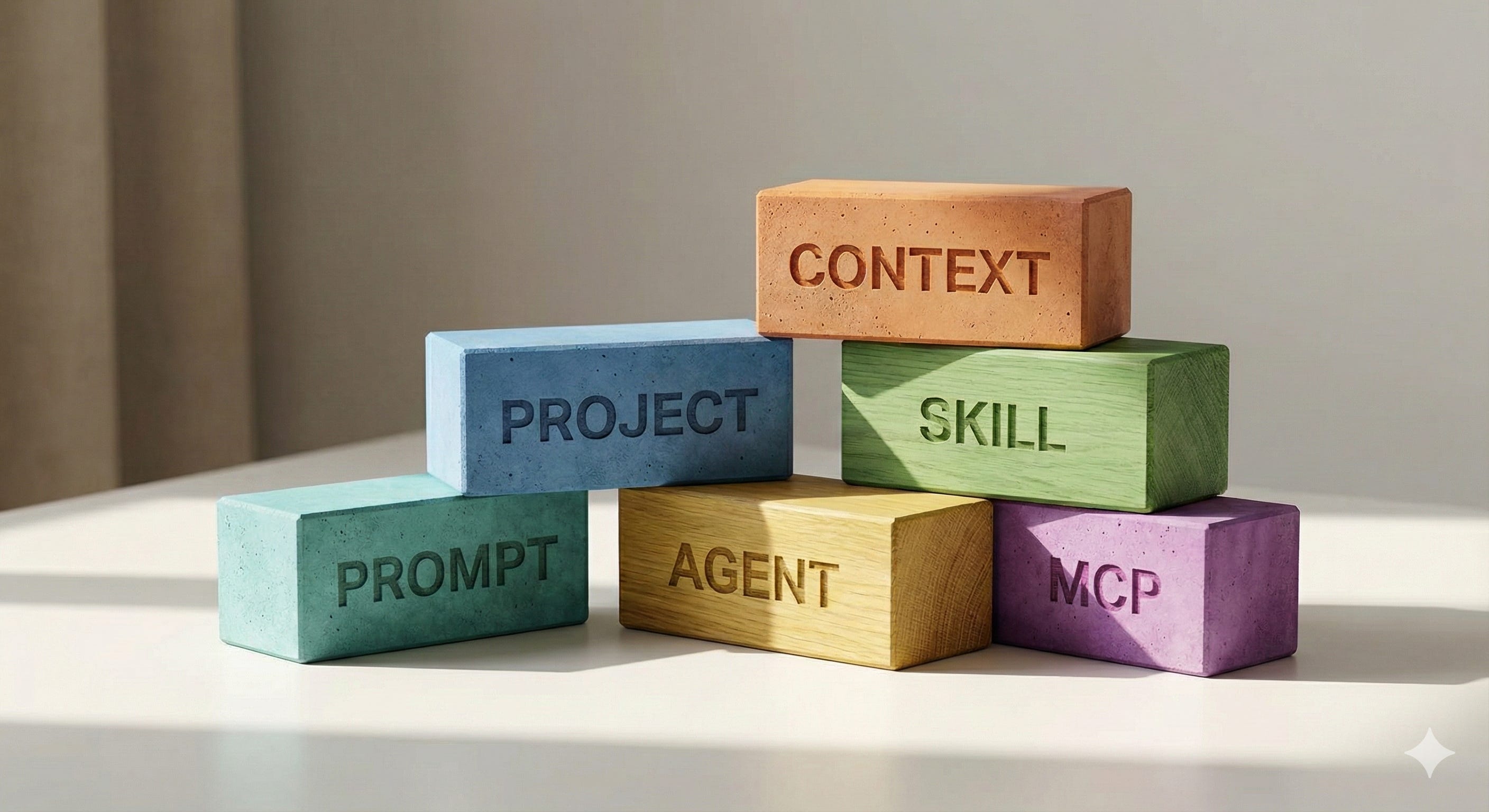
Should I write a better prompt? Create a Project? Build a Skill? Set up an Agent? Connect MCP?
You know this workflow can become AI-first. You’re just not sure which building blocks to reach for.
This decision paralysis is universal. I hear it from executives in my Maven courses, from consulting clients, from readers of this newsletter. Everyone hits the same wall: I know the pieces exist, but I don’t know which ones I need or how they fit together.
The paralysis happens because we don’t understand the building blocks of agentic AI—what each one does, when to use it, and how they work together.
But here’s what I’ve learned after building dozens of workflows and teaching thousands of leaders: the deeper issue isn’t technical. It’s mindset.
Most leaders are still thinking like task executors: “How do I get AI to do this task?”
The shift is to workflow architect: “How do I design a system that accomplishes this goal?”
Each building block represents a different level of architectural thinking:
Prompts = Reactive. You’re in the loop for every action.
Context + Projects = Organized. You’re curating knowledge.
Skills = Systematized. You’re codifying expertise.
Agents + MCP = Orchestrated. You’ve designed a system.
This article will give you the mental model to make confident decisions about which building blocks to use—and more importantly, how to combine them into workflows that actually work.
By the end, I’ll show you exactly how I use all six building blocks together in a real workflow I run every week: designing cohort courses.
What Makes a Workflow “Agentic”?
Before we dive into building blocks, let’s establish what we’re actually building toward.
Andrew Ng offers the clearest definition: “An agentic workflow is a process where an LLM-based app executes multiple steps to complete a task.”
The key phrase is multiple steps. When you type a question into ChatGPT and get an answer, that’s not agentic—that’s a single inference. When an AI system researches a topic, synthesizes findings, drafts a report, evaluates quality, and revises based on that evaluation, that’s agentic.
But not all agentic systems are created equal. They exist on a spectrum of autonomy:
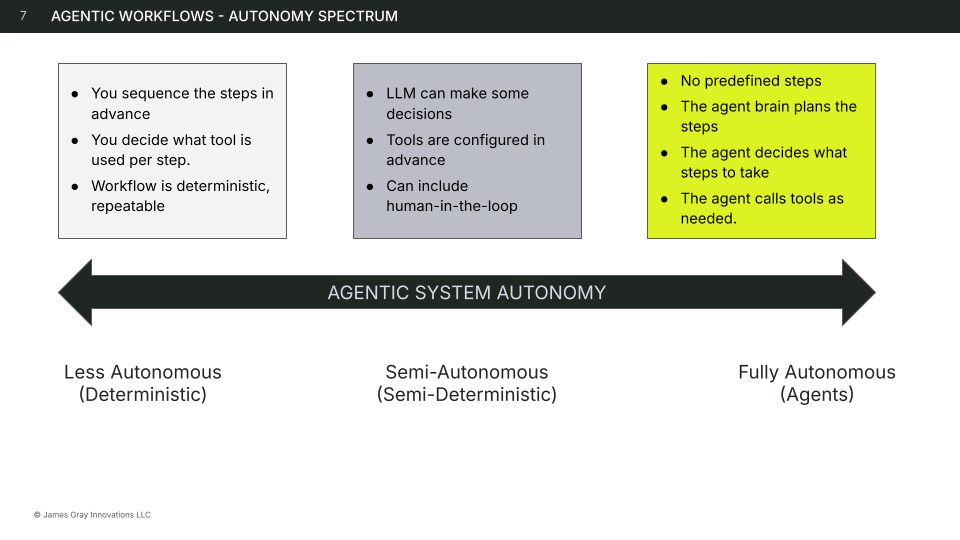
Deterministic (Less Autonomous) sits at one end. You sequence the steps in advance. You decide which tool to use for each step. The workflow is deterministic and repeatable—same inputs always produce the same outputs. You’re in full control of the process; the AI executes within tightly defined boundaries.
Semi-Autonomous (Semi-Deterministic) occupies the middle. The LLM can make some decisions within each step, but tools are configured in advance. This is where human-in-the-loop workflows live—you maintain oversight and approval authority while the AI handles reasoning and execution. There’s variation in output, but the overall flow is structured.
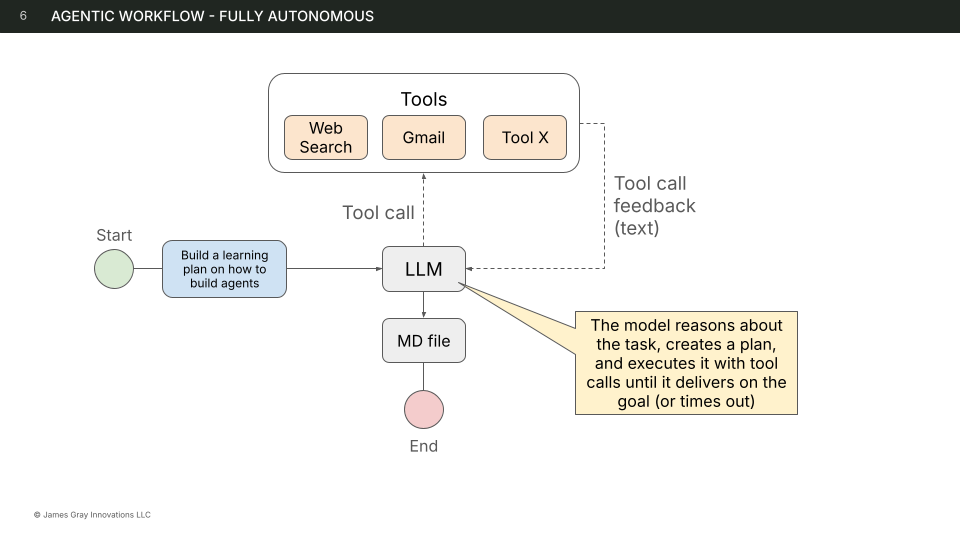
Fully Autonomous (Agents) sits at the other end. No predefined steps. The agent brain plans the steps. The agent decides what steps to take and calls tools as needed. You set the goal; the agent figures out the route. The path and output vary based on what the agent discovers along the way.
Here’s what most people miss: you don’t always need a fully autonomous agent.
In fact, most business workflows benefit from the middle ground—semi-autonomous workflows where humans stay in the loop for judgment calls. You get the power of AI reasoning without surrendering control over decisions that matter.
Why does the agentic approach outperform simple prompting? Several reasons:
Speed. You can run LLM steps in parallel rather than sequentially.
Higher performance. Models that use extended reasoning can think more deeply and for longer on complex problems.
Modularity. You can use different LLMs optimized for each step—a fast model for simple tasks, a powerful model for complex reasoning.
Repeatability. Deterministic workflows execute consistently every time.
Adaptability. When you don’t know the exact steps required beforehand, agents can plan on the fly.
The building blocks I’m about to walk through are the components you’ll combine to create workflows at whatever level of autonomy your situation requires.
The Six Building Blocks
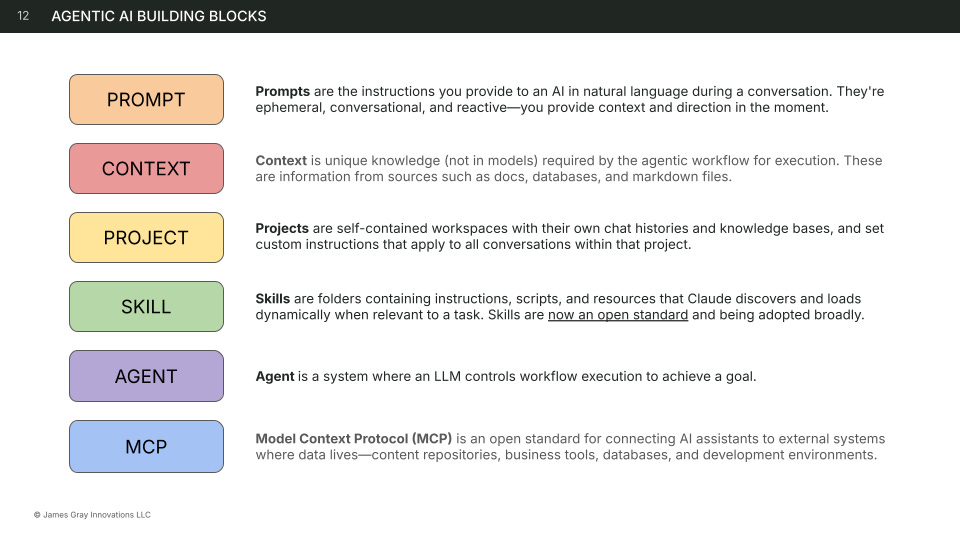
Let’s examine each building block in detail: what it is, when to use it, and when to reach for something else instead.
1. Prompt
What it is: Instructions you provide to an AI in natural language during a conversation. Prompts are ephemeral, conversational, and reactive—you provide context and direction in the moment.
Three characteristics:
Ephemeral. A prompt exists only within a single conversation. When you start a new chat, you start fresh. There’s no memory, no persistence, no accumulated context.
Conversational. Prompts are written in natural language. You’re not programming; you’re communicating. This makes them accessible but also means they require clarity and specificity to work well.
Reactive. You provide direction in real-time based on what you see. The AI responds, you evaluate, you redirect. It’s a dialogue, not a script.
When to use prompts:
Prompts are your primary interface with AI. Use them for:
One-off requests. “Summarize this article.” “What are the key themes in this data?”
Exploring new problems. When you don’t yet know what you need, prompts let you iterate quickly.
Quick questions or drafts. Low-stakes work where speed matters more than consistency.
Conversational refinement. “Make that more concise.” “Add an example.” “Adjust the tone.”
Creative collaboration. Working with AI as a thought partner, bouncing ideas back and forth.
Real example:
When I’m developing a new lesson, I’ll often start with a prompt like: “Review this lesson outline and suggest where students might get stuck. Focus on the hands-on exercise—is it too ambitious for a 90-minute session?”
This isn’t a repeatable workflow. It’s a specific question about a specific artifact in the moment. That’s what prompts are for.
When to use something else:
If you find yourself typing the same prompt repeatedly across multiple conversations, that’s a signal. You’ve identified a pattern worth systematizing. Transform that recurring prompt into a Skill so you don’t have to re-explain the procedure every time.
The shift from prompt to Skill is a shift from reactive to proactive—from explaining what you want in the moment to codifying what you want once so it applies automatically.
2. Context
What it is: Unique knowledge not contained in AI models, required by the workflow for execution. Context is information from sources like documents, databases, files, and proprietary data that the AI wouldn’t otherwise have access to.
Three characteristics:
Uploaded files. PDFs, spreadsheets, images, code files—anything you attach to a conversation or project. The AI can read and reference this information directly.
Referenced documents. Google Docs, Notion pages, Markdown files—documents that exist in external systems that you bring into the AI’s awareness, either by copy-pasting or through connected integrations.
Connected data. Databases, APIs, real-time systems—structured information that the AI can query dynamically. This is where Context intersects with MCP, which we’ll cover later.
When to use context:
Context bridges the gap between what AI knows from training and what it needs to know for your specific situation. Use it when:
AI needs company-specific information. Your product specs, pricing, org structure, competitive landscape—none of this is in the model’s training data.
Working with proprietary data. Customer lists, internal metrics, strategic plans—information that should never have been in public training data.
Referencing brand guidelines or standards. Voice, tone, visual identity, compliance requirements—the rules that govern how work should be done at your organization.
Grounding responses in facts. When accuracy matters more than creativity, context provides the source of truth.
Real example:
My course curriculum lives in a Notion database: courses, modules, lessons, assignments, and learning objectives. When I’m designing a new course, Claude needs access to this context to understand what I’ve already built, maintain consistency with the existing curriculum, and avoid duplicating content.
Without this context, Claude would be working blind—generating content that might be good in isolation but doesn’t fit my larger system.
When to use something else:
Context provides the what—the information the AI needs to reference. But information alone isn’t instruction. If you need to teach Claude how to process that information—what patterns to follow, which quality standards to apply, and which output format to use—you need a Skill.
Think of it this way: Context is the textbook. Skills are the lesson plan.
3. Project
What it is: Self-contained workspaces with their own chat histories and knowledge bases. Projects let you set custom instructions that apply to all conversations within that project, creating a persistent environment for related work.
Three characteristics:
Custom instructions. Rules, preferences, and guidelines that apply to every conversation in the project. You write them once; they shape every interaction. This is where you encode voice, perspective, constraints, and working style.
Persistent context. Files, documents, and data that stay available across all conversations in the project. You don’t re-upload; the knowledge is always there, always accessible.
Isolated memory. Chat history from one project doesn’t pollute another. Your investor communications project stays separate from your product development project. Context doesn’t bleed across boundaries.
When to use projects:
Projects are workspaces. They make sense when you have related work that spans multiple conversations and benefits from shared context. Use them for:
Related work spanning multiple conversations. A course you’re developing, a client engagement, a product launch—any initiative that involves many separate working sessions over time.
Consistent rules for a specific domain. When every conversation in a certain area should follow the same guidelines, encode those in project instructions rather than repeating them.
Team collaboration with shared context. On Team and Enterprise plans, projects let multiple people work within the same knowledge environment.
Separating work contexts. Client A shouldn’t share context with Client B. Personal projects shouldn’t mix with work projects. Projects create clean boundaries.
Real example:
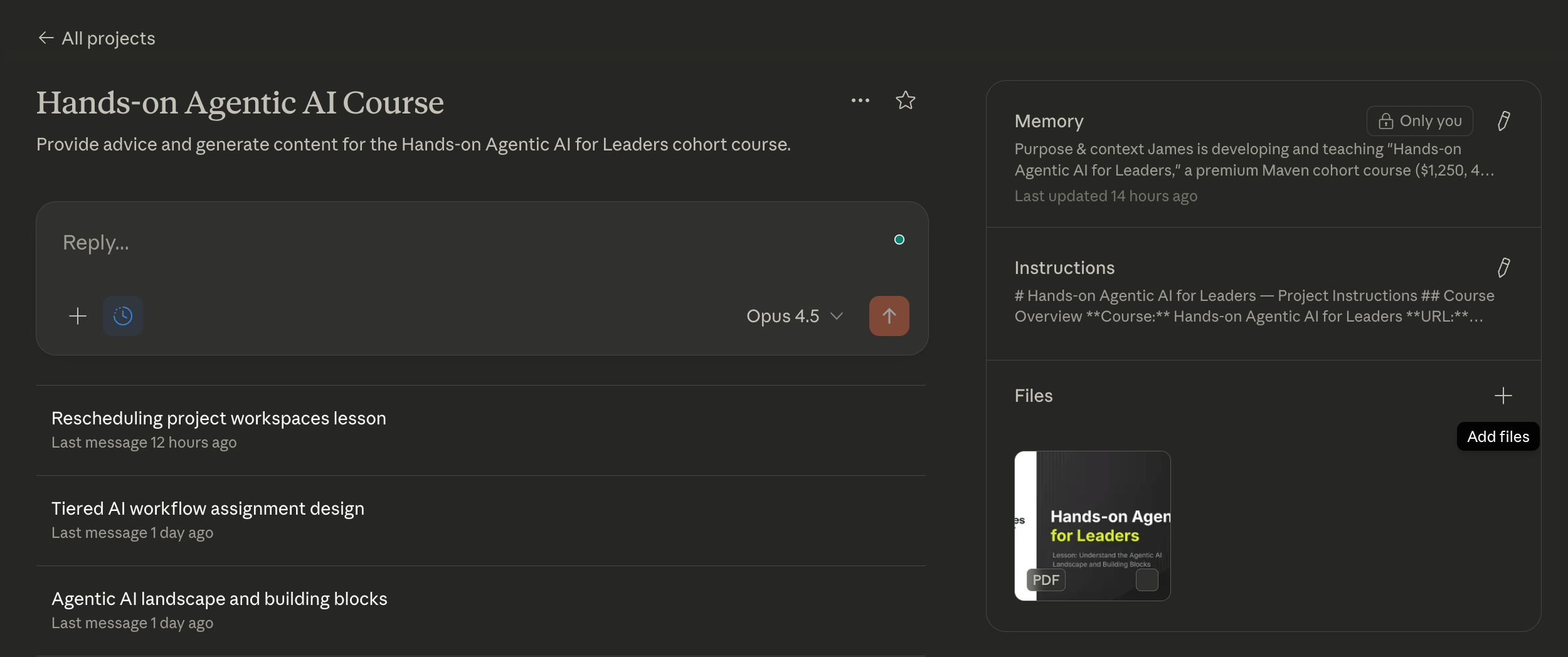
I have a Claude Project named “Hands-on Agentic AI for Leaders”—the same name as the course. The project contains:
Custom instructions: “Follow Maven’s course design principles. Use Bloom’s Taxonomy for learning objectives. Maintain my teaching voice—strategic but accessible, always grounded in real examples. Focus on hands-on application over theory.”
Uploaded context: My course template, brand guidelines, sample syllabi from successful courses, and the Maven instructor guidelines.
Every conversation about this course happens in this project. Whether I’m designing a new module, refining a lesson, or writing promotional copy, Claude starts with the same foundation. I never have to re-explain my standards or re-upload my references.
When to use something else:
Projects provide background knowledge—static reference material that’s always loaded for a specific initiative. But that knowledge is locked to the project.
If you need portable expertise that works across multiple projects, create a Skill instead. Skills are reusable; they can be invoked from any conversation, any project, any context. Projects say, “Here’s what you need to know for this initiative.” Skills say, “Here’s how to do this kind of work, anywhere.”
4. Skill
What it is: Folders containing instructions, scripts, and resources that Claude discovers and loads dynamically when relevant to a task. Skills are specialized training manuals that give Claude expertise in specific domains—expertise that persists and transfers across conversations.
Three characteristics:
Portable. A Skill isn’t locked to one project or conversation. Once created, it can be invoked anywhere—different projects, different contexts, different team members. Your expertise becomes reusable infrastructure.
Reusable. One Skill applies to many situations. A Skill for writing compelling course outcomes works whether you’re building Course A or Course B, whether you’re in your planning project or your marketing project.
Efficient. Skills use progressive disclosure. Metadata loads first (~100 tokens), providing just enough for Claude to know when the Skill is relevant. Full instructions load when needed (<5k tokens). Bundled files or scripts load only as required. You can have dozens of Skills available without overwhelming Claude’s context window.
The key distinction: Skills are training manuals, not employees. They teach how to do something; they don’t autonomously do it. An employee (Agent) reads the training manual (Skill) and executes the work.
When to use skills:
Skills codify expertise. They’re the answer to “I keep explaining the same thing over and over.” Use them for:
Repeatable workflows with best practices. Any procedure you’ve refined through experience and want to preserve.
Standardizing tasks across team or projects. When quality and consistency matter, Skills ensure everyone follows the same playbook.
Creating “recipes” others can follow. Skills are shareable. You can build expertise once and distribute it.
Building a library of codified knowledge. Over time, your Skills become a knowledge base of how work should be done.
Real example:
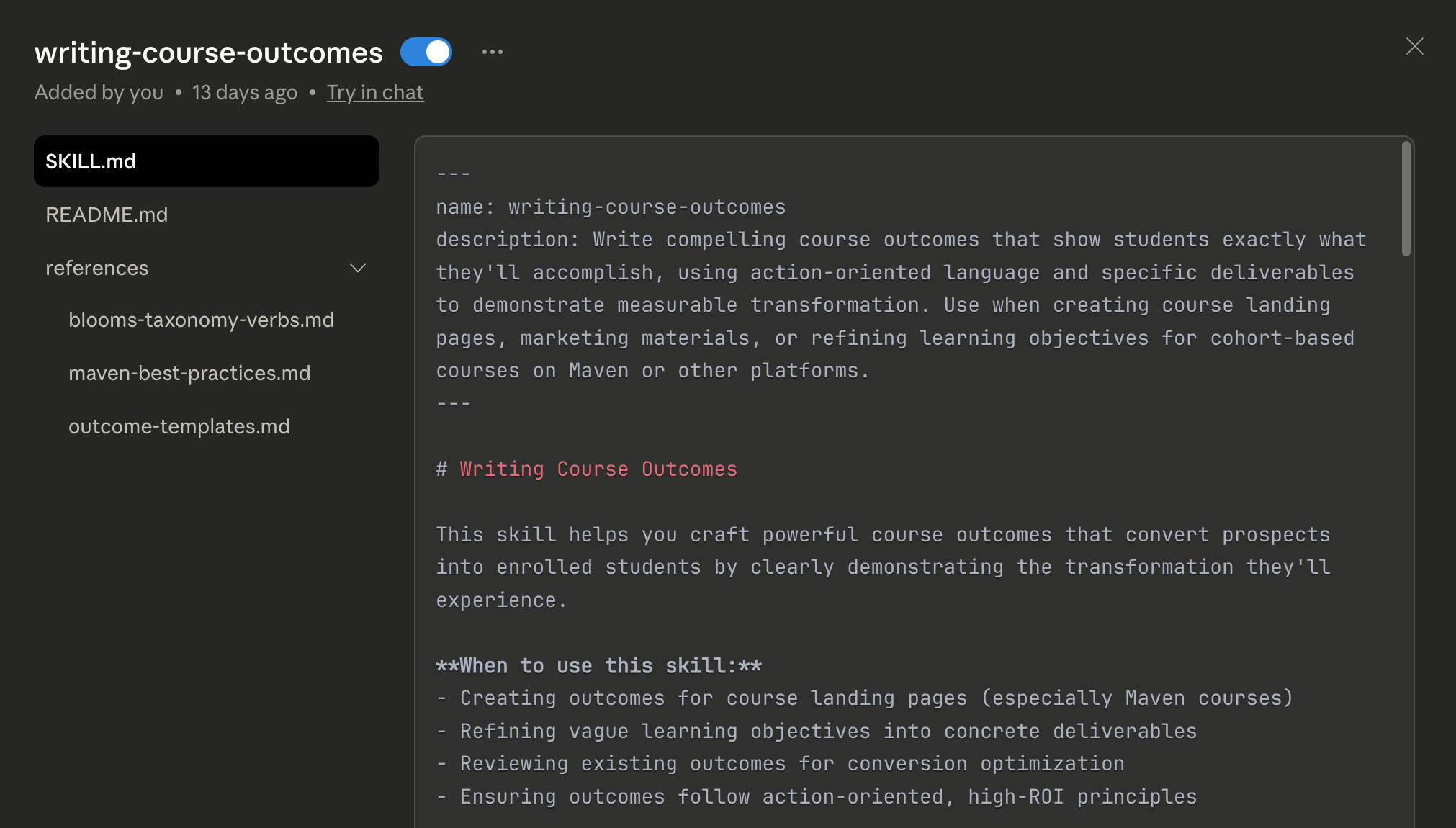
I have a Skill called writing-course-outcomes. It contains:
Instructions on action-oriented language, measurable transformation, and the specific format that converts on Maven landing pages.
Examples of high-converting outcomes from courses that have performed well.
Quality checklist for evaluating whether an outcome meets the bar.
When I ask Claude to help me write outcomes for a new course, this Skill activates automatically. I don’t explain my standards; Claude already knows them. The output is consistent with every other course I’ve built because the Skill encodes what “good” looks like.
This Skill works in my “Hands-on Agentic AI for Leaders” project. It also works in my “Claude for Builders” project. It would work if I were helping a colleague design their own course. The expertise is portable.
When to use something else:
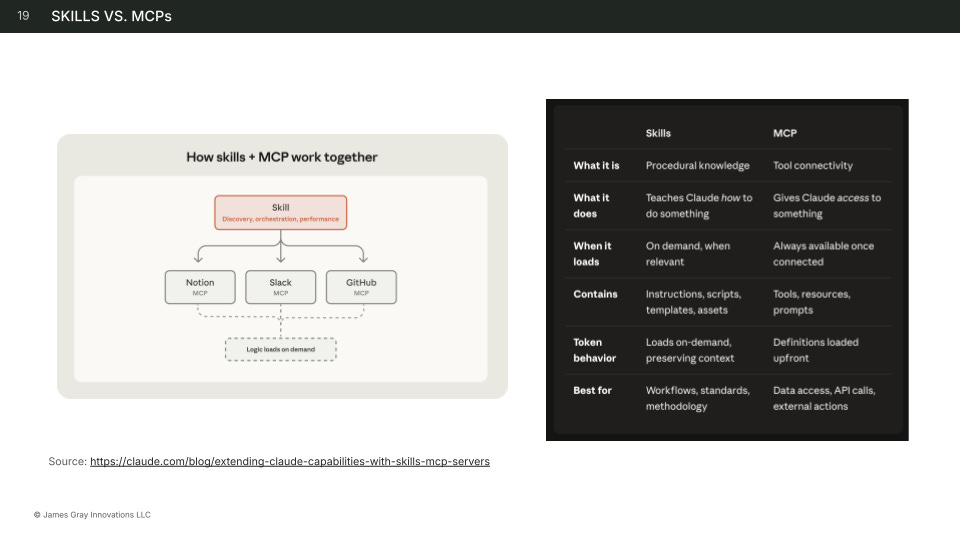
Skills teach methodology. But they don’t provide access to external systems. If you need Claude to read from a database or write to an API, that’s MCP—Skills teach what to do with the data; MCP provides the connection to get the data.
And if you need fully autonomous execution—work that runs without your involvement—that’s an Agent. Agents can use Skills (the employee reads the training manual), but Skills alone don’t execute autonomously.
Note on the Skills standard: The Agent Skills format was originally developed by Anthropic, released as an open standard, and is being adopted across the industry. This portability is intentional—Skills you build today will work across an expanding ecosystem of AI tools.
5. Agent
What it is: A system where an LLM controls workflow execution to achieve a goal. Agents plan their approach, use tools, reflect on progress, and operate with varying levels of autonomy—from semi-autonomous (human approves each step) to fully autonomous (executes completely and reports results).
Three characteristics:
Semi-autonomous. Human approves each step. The agent proposes actions; you greenlight them. You maintain control while offloading the cognitive work of figuring out what to do next.
Fully autonomous. Agent executes completely, reports results. You set the goal and constraints; the agent determines the approach, takes actions, and delivers the outcome. You review the end product, not every intermediate step.
Continuous. Agent runs on schedule or trigger events. Not just a one-time execution but an ongoing process—monitoring for changes, taking action when conditions are met, operating in the background.
The key distinction: Skill = Training manual (teaches HOW). Agent = Employee (EXECUTES autonomously). An agent might use multiple Skills in the course of completing a task, just as an employee might reference multiple training manuals. But the agent is the entity doing the work.
When to use agents:
Agents make sense when you can clearly define the goal and success criteria, but the path to get there requires judgment, iteration, or isn’t fully known in advance. Use them for:
Workflows with clear success criteria. “Produce a competitive analysis covering these five dimensions.” The goal is clear; the agent figures out how to achieve it.
Multi-step tedious processes. Work that involves many small steps, each straightforward but time-consuming in aggregate.
Tasks requiring tool access. When the work involves reading from APIs, querying databases, searching the web, or writing to external systems.
Work benefiting from iteration. Tasks where the first draft needs evaluation and revision—agents can self-critique and improve.
Complex decision-making. When the right path depends on what’s discovered along the way.
Real example:
Imagine a “Course Launch Prep” agent:
Goal: “Prepare all marketing assets for the new cohort of Hands-on Agentic AI for Leaders.”
Execution: The agent reads the course data from Notion (via MCP), generates the course description using the writing-course-overview Skill, writes email sequences for the launch, creates social media posts, formats landing page copy—all following the patterns encoded in relevant Skills.
Output: A complete set of marketing assets, ready for human review before publishing.
I’m not approving each sentence the agent writes. I’m reviewing the finished work product. The agent handled the execution; I provide the quality judgment.
When to use something else:
Agents introduce variability. Because they plan dynamically, the same goal might be achieved through different paths on different runs. This is a feature when you need adaptability, but a bug when you need consistency.
If your workflow is highly repeatable and the steps are known, a deterministic workflow—where you define the sequence in advance—may be more reliable than a fully autonomous agent. Not every problem needs an agent; sometimes a well-designed workflow with human checkpoints is the right answer.
6. MCP (Model Context Protocol)
What it is: An open standard for connecting AI assistants to external systems where data lives—content repositories, business tools, databases, and development environments. Think of MCP as “USB for AI”—a universal connection layer.
Three characteristics:
Data sources. Read from databases, documents, wikis—pulling information into the AI’s context. MCP lets Claude see what’s in your systems without manual copy-paste.
Action tools. Write to systems—create tasks, send emails, update records. MCP isn’t just about reading; it’s about taking action in the real world.
Real-time systems. Live data feeds, webhooks, monitoring. Not just static snapshots but dynamic connections to systems that change.
When to use MCP:
MCP bridges the gap between AI reasoning and real-world systems. Use it when:
AI needs to access external systems. Google Drive, Notion, Slack, GitHub, CRM—any tool where your data lives.
Workflows require real-time data. When you need current information, not what was true when you uploaded a file last week.
Actions must persist beyond the chat. Creating a task in your project management tool, updating a database record, sending a notification—work that should exist outside the conversation.
Building production-grade systems. MCP provides the integration layer that makes AI workflows production-ready.
Real example:
My course design workflow connects to Notion via MCP:
Read: Claude pulls existing courses, modules, and lessons from my database. It knows what I’ve already built.
Write: When we finalize a new lesson, Claude creates the record directly in Notion with the correct properties—title, learning objectives, duration, assignment details.
Query: Claude can search across my curriculum to find related content, check for duplicates, or identify gaps in coverage.
Without MCP, I’d be copy-pasting between Notion and Claude constantly. With MCP, the systems talk to each other. The workflow is seamless.
When to use something else:
MCP provides connectivity—access to data and the ability to take action. But connectivity without methodology is just plumbing.
Skills teach Claude what to do with the data MCP provides. A Notion MCP connection lets Claude read your database; a naming-lesson-titles Skill teaches Claude how to name lessons according to Bloom’s Taxonomy. You need both: MCP for access, Skills for expertise.
Use them together.
How the Building Blocks Work Together
Each building block serves a distinct purpose. The real power emerges when you combine them.
Prompts + Skills
Use Skills to provide foundational expertise—the methodology, standards, and patterns that should inform the work. Use prompts to provide specific context and real-time refinement—the details of this particular task and the adjustments you want along the way.
Skills are proactive (Claude knows when to apply them). Prompts are reactive (you provide direction in the moment). Together, they give you consistent quality with flexible execution.
Projects + Context
Projects provide the workspace—the custom instructions, the persistent environment, the isolated memory. Context provides the knowledge within that workspace—the documents, data, and information Claude needs to reference.
A project without context is an empty room with rules on the wall. Context without a project is a pile of documents with no organization. Together, they create an environment where sustained work can happen.
Skills + MCP
MCP gives Claude access to your systems. Skills teach Claude what to do once connected.
A Notion MCP connection lets Claude read your database. Your Skills teach Claude how to interpret that data, what patterns to follow when creating new records, what quality standards to apply. MCP is the highway; Skills are the driving instructions.
Skills + Agents
Agents execute work autonomously. Skills provide the expertise that shapes how that work gets done.
An agent can use multiple Skills in the course of completing a task—referencing writing-course-outcomes when generating outcomes, naming-lesson-titles when structuring lessons, pricing-maven-courses when calculating pricing. The agent is the employee; Skills are the training manuals the employee has studied.
The Comparison at a Glance:
Prompts: Moment-to-moment instructions. Single conversation. Natural language. Quick requests.
Context: Background knowledge. Uploaded or connected data. Information the AI wouldn’t otherwise have.
Projects: Persistent workspace. Custom instructions plus documents. All conversations in a domain share the same foundation.
Skills: Portable expertise. Instructions plus code plus assets. Specialized methodology that works anywhere.
Agents: Autonomous execution. Full workflow logic. Specialized tasks executed without step-by-step oversight.
MCP: Tool connectivity. Connection to external systems. Data access and action capability.
Real Example: My Course Design Workflow
Let me show you how these building blocks work together in a workflow I use regularly: designing cohort courses.
The Workflow
Name: Course Design
Type: Semi-Autonomous (human-in-the-loop)
Trigger: On-demand, when I’m developing a new course or major revision
Outcome: Launch-ready course package—outline, lessons, learning objectives, assignments, marketing positioning
This isn’t a fully autonomous agent. It’s a semi-autonomous workflow where Claude and I collaborate, with Claude handling structured work while I provide creative direction and quality judgment.
Here’s how each building block plays its role:
Building Block #1: Project
I have a Claude Project named “Hands-on Agentic AI for Leaders”—the same name as the course. This project contains:
Custom instructions: My teaching philosophy, Maven’s course design principles, quality standards for learning objectives, my voice and tone preferences. Every conversation in this project inherits these guidelines.
Uploaded files: My course development template, brand guidelines, examples of high-performing course materials, the Maven instructor handbook.
When I start a new conversation in this project, Claude already knows the context. I don’t re-explain my standards; they’re baked into the environment.
Building Block #2: Context via MCP
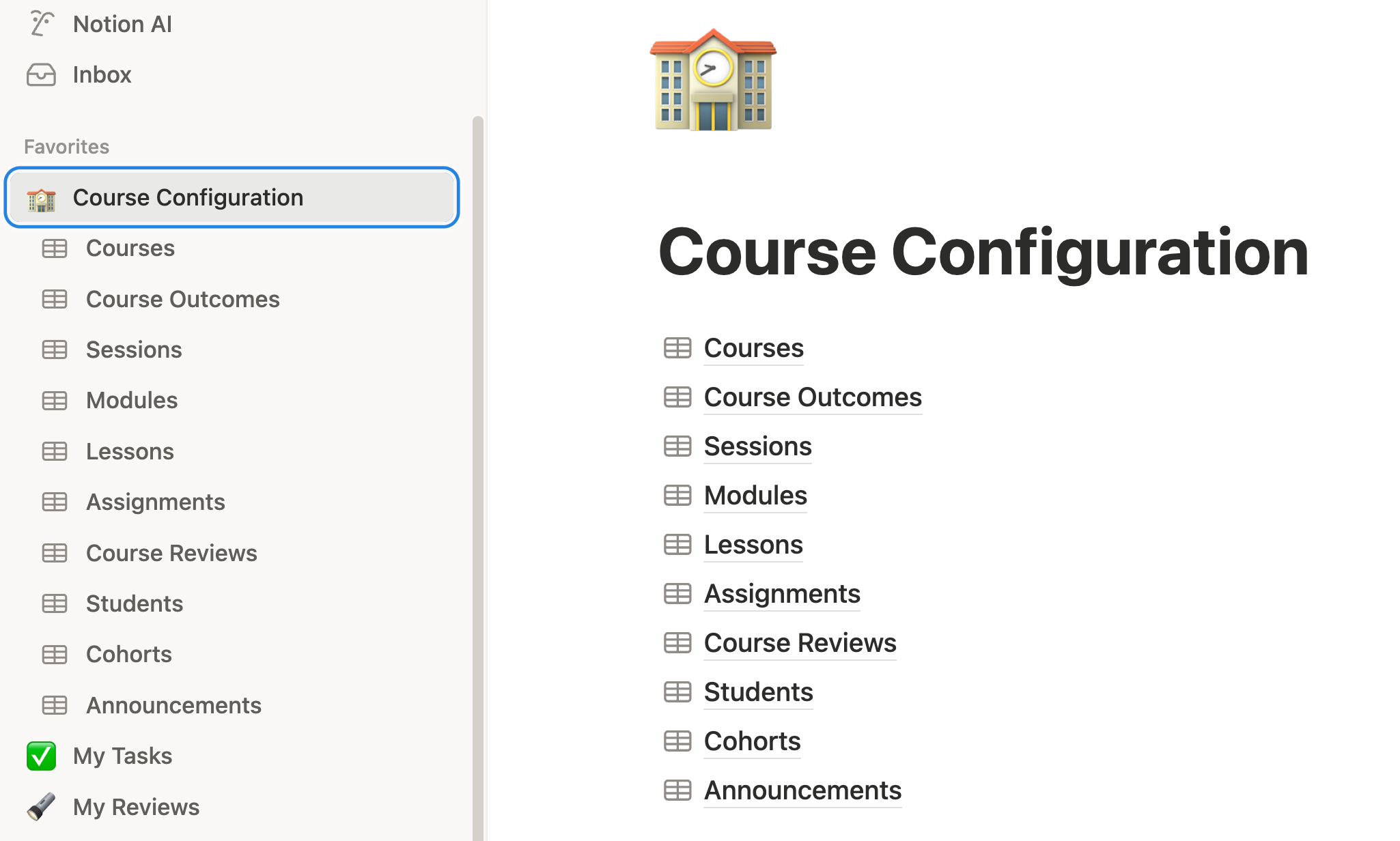
My curriculum lives in Notion, connected via MCP. Claude has access to:
Courses database: All my courses with descriptions, pricing, positioning, and status.
Course Outcomes database: The learning promises—what students will be able to do after completing the course.
Sessions database: The live class schedule—when we meet, for how long.
Modules database: The structural units within each course—what topics get covered in what sequence.
Lessons database: Individual teaching units with objectives, duration, and content notes.
Assignments database: Hands-on exercises with instructions, deliverables, and evaluation criteria.
Course Reviews database: Student feedback and testimonials from past cohorts.
Students database: Enrolled participants with their backgrounds, goals, and progress.
Cohorts database: Each running instance of a course—dates, enrollment, and cohort-specific details.
Announcements database: Communications sent to students during a cohort.
This connected context means Claude sees my entire curriculum and student ecosystem. When designing new content, Claude can check what I’ve already built, review past student feedback, maintain consistency, and identify gaps.
Building Block #3: Skills
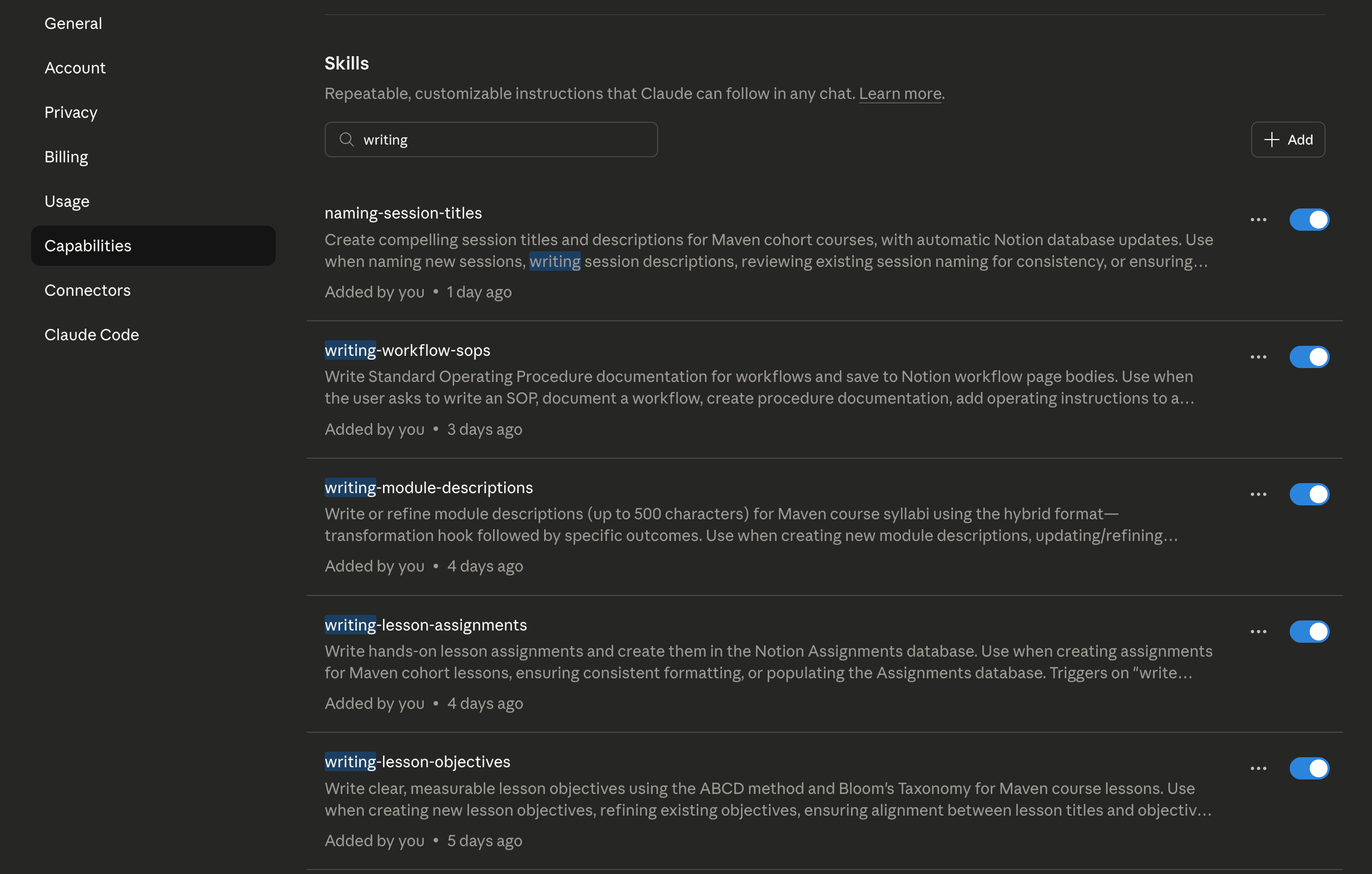
I have twelve Skills attached to my course design workflow. They activate dynamically when relevant:
Course Architecture Skills:
naming-maven-courses — Generates conversion-optimized course titles using the “X skill for Y persona” formula.
designing-course-syllabus — Maps course outcomes to module structure and lesson sequences.
writing-course-outcomes — Writes compelling learning promises with action-oriented language and measurable transformation.
writing-course-overview — Creates “Why This Course Matters” copy using the proven 3-part structure (current state, future state, the how).
pricing-maven-courses — Calculates optimal pricing using Maven guidelines and live competitive analysis.
Module & Session Design Skills:
writing-module-descriptions — Writes syllabus descriptions using the hybrid format (transformation hook + specific outcomes).
naming-session-titles — Creates session names following Maven cohort patterns.
Lesson Development Skills:
naming-lesson-titles — Names lessons using Bloom’s Taxonomy cognitive levels with appropriate action verbs.
writing-lesson-objectives — Writes measurable objectives using the ABCD method (Audience, Behavior, Condition, Degree).
writing-lesson-assignments — Creates hands-on exercises with clear instructions and deliverables.
creating-lesson-content — Develops actual lesson materials—slides, exercises, supplementary resources.
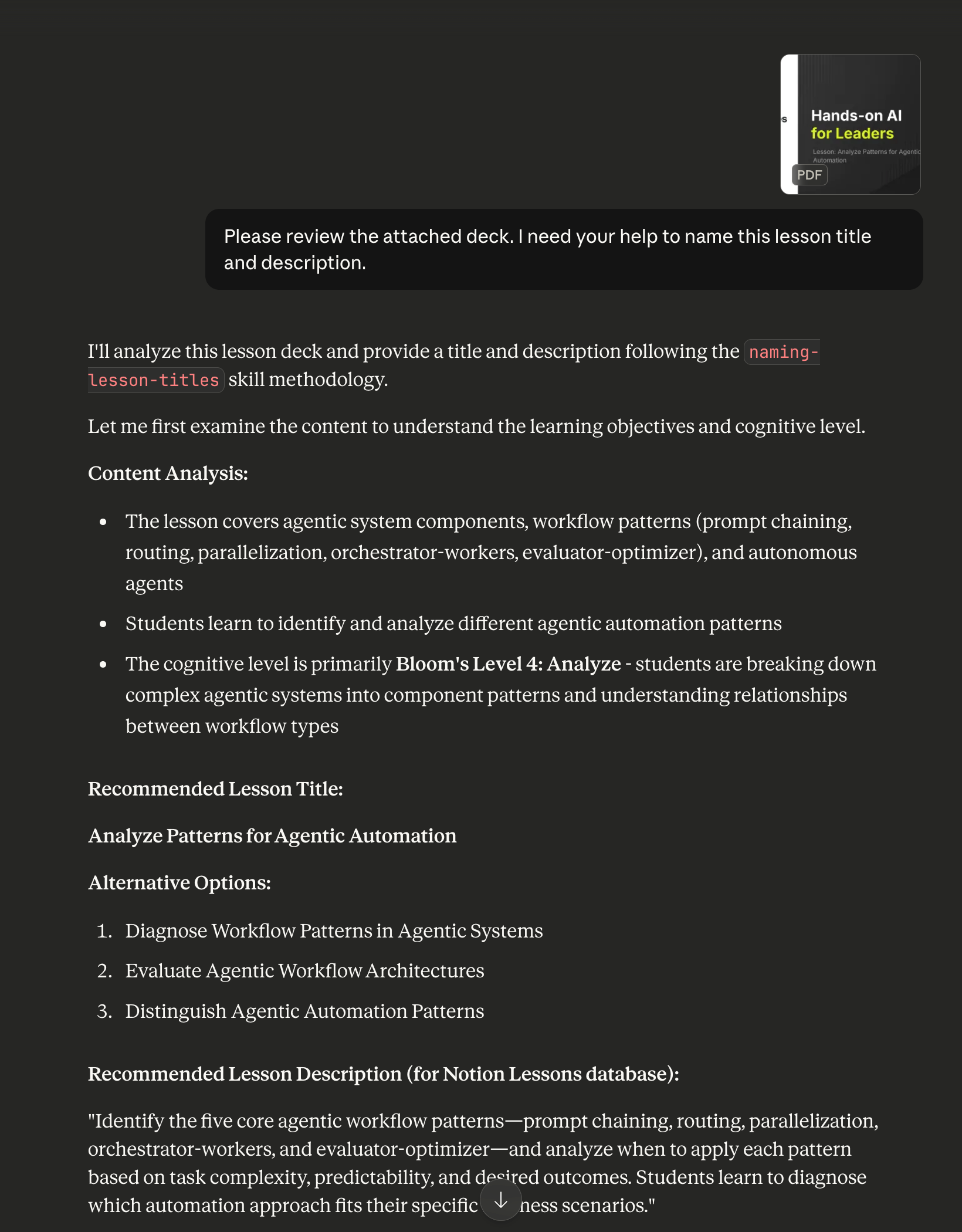
Each Skill contains detailed instructions, examples, and quality checklists. When I ask Claude to help name a lesson, the naming-lesson-titles Skill activates automatically. Claude knows to use Bloom’s Taxonomy, knows what action verbs fit each cognitive level, knows my standards for what makes a good lesson title.
I didn’t explain any of this in the conversation. The Skill encoded the expertise. Claude applied it.
Building Block #4: Prompts
This is where the collaboration happens. With Project, Context, and Skills in place, I use prompts for creative direction and real-time refinement:
“Review this module sequence—does the progression make sense for someone new to agentic AI?”
“The hands-on exercise feels too complex for a 90-minute session. Can you simplify while keeping the learning objective intact?”
“Write three alternative course titles. I want something that signals ‘builder’ not just ‘strategist.’”
“Look at my existing courses in Notion. Where does this new course fit in the learning journey? What should I reference as prerequisites?”
The prompts are specific to the moment—this lesson, this decision, this creative question. They build on the foundation provided by the other building blocks.
How It Flows
Here’s what a typical session looks like:
I open my “Hands-on Agentic AI for Leaders” project in Claude.
Claude loads my custom instructions and connects to my Notion databases via MCP.
I describe what I’m working on: “I’m developing a new lesson on agentic AI building blocks. The learning objective is for students to be able to select appropriate building blocks for a workflow from their catalog.”
Claude activates relevant Skills—
naming-lesson-titles,writing-lesson-objectives,creating-lesson-content.We iterate. Claude drafts a lesson outline. I react: “The section on Skills is too abstract—add a concrete example.” Claude revises.
Skills ensure consistency. Every lesson title follows Bloom’s Taxonomy. Every objective uses the ABCD method. Every assignment has the same structure. Not because I reminded Claude, but because the Skills encoded the standards.
When we finalize content, Claude writes directly to Notion via MCP—creating lesson records, updating module sequences, linking assignments.
The Result
What used to take me 2-3 weeks of scattered work now happens in focused 2-3 hour sessions.
Not because AI does it all. The creative decisions are still mine. The quality judgment is still mine. The teaching philosophy is still mine.
But I’ve designed a system where AI handles the structured work—the formatting, the consistency checks, the database updates, the pattern-following—while I focus on the decisions that require human judgment.
That’s the shift from task executor to workflow architect.
Getting Started
You don’t need all six building blocks on day one. Start simple, then layer.
Step 1: Identify a Workflow
Pick one workflow you do repeatedly. Write down the steps. Notice what information you need, what decisions you make, what patterns you follow. Don’t try to automate it yet—just observe.
Step 2: Create a Project
Set up a Claude Project for that workflow. Write custom instructions that capture your standards, preferences, and guidelines. Upload relevant reference documents. Now every conversation about this work starts from the same foundation.
Step 3: Notice Repetition
Pay attention to what you explain repeatedly. “Use this format.” “Follow this framework.” “Check these criteria.” Each repeated explanation is a candidate for a Skill. Build your first one.
Step 4: Connect a Data Source
If your workflow involves external data—documents in Google Drive, records in Notion, information in a database—explore MCP connections. Moving from manual copy-paste to live connectivity is a significant upgrade.
The Mindset Throughout
You’re not learning tools. You’re evolving how you think about your work.
Each building block you add represents a piece of your expertise that now scales beyond your personal attention. Your prompts become Skills. Your mental checklists become custom instructions. Your scattered files become connected context.
The technical implementation matters, but the transformation is in your identity: from someone who does the work to someone who designs systems that do the work.
The Bigger Picture
The building blocks matter. But the real transformation is in how you think about your work.
When you stop asking “How do I get AI to do this?” and start asking “How do I design a system that accomplishes this?”—you’ve made the shift from user to architect.
This is what I mean by dual mastery. The AI skills matter—understanding prompts, context, projects, skills, agents, MCP. But equally important is the self-mastery required to evolve your role.
You’re not becoming obsolete. You’re becoming the person who designs the systems that scale beyond any individual’s capacity. That’s a more valuable role, not a less valuable one.
But it requires you to let go of the identity tied to doing the work yourself. It requires building trust in systems you’ve designed. It requires thinking in workflows rather than tasks.
The building blocks are the technical foundation. The willingness to evolve how you work—that’s the human foundation.
Both matter. Master AI. Master yourself. Build what matters.
If you want to go deeper on building agentic workflows, I teach this hands-on in my Maven courses:
Hands-on Agentic AI for Leaders — For leaders and professionals building their first AI-augmented workflows. We focus on practical implementation, starting with the workflows you already do and systematically upgrading them with the building blocks covered in this article.
Claude for Builders — For practitioners ready to build production systems and go deep on the Claude Platform. We go deeper on Skills architecture, MCP integrations, and agent design patterns. You will also build an app with Claude Code and deploy it to Vercel.
Both are cohort-based, project-driven, and focused on building real systems—not just understanding concepts. You’ll leave with workflows running, not just knowledge acquired.
What workflow are you thinking about systematizing? Reply and tell me—I read every response.
And if you know a friend or colleague building AI-powered workflows who could benefit from this guide, please share it with them.
Stay curious, stay hands-on.
-James